Internet Explorer 9
Windows Internet Explorer 9(简称 IE9)于 2011 年 3 月 14 日发布.....
Install Rust12312321
open “https://www.rust-lang.org/zh-CN/tools/install” in browser, read the manual to install Rust..
Change the cargo registry source URL for update
 $ cd ~/.cargo/
 $ vim config
Paste blow text
 [source.crates-io]
 registry = "https://github.com/rust-lang/crates.io-index"
 replace-with = 'ustc'
 [source.ustc]
 registry = "git://mirrors.ustc.edu.cn/crates.io-index"
Exec blow command
cargo install mdbook #wait a minute ,the programm will compiler source code
How use
 mdbook --help

 mdbook serve --open # usually
Enjoy !!
And notice your .profile & bashrc file, maybe you should run commandsource .profile
Html5 API
Reference
Html Element
CSS
Html5 API
geolocation
draggable
Storage
Web Worker
SSE
HTML Cache Manifest
WebSocket
<button onclick="getGeo()">geolocations</button>
<script>
    function getGeo () {
        if (navigator.geolocation) {
            navigator.geolocation.getCurrentPosition(success, error)
        } else {
            console.log("your browser not support geolocation !!")
        }
    }
    function error (err) {
        console.log(err)
    }
    function success (position) {
        console.log("latitude: "+ position.coords.latitude)
        console.log("longitude: "+ position.coords.longitude)
    }
</script>
<script type="text/javascript">
    function allowDrop(ev)
    {
        ev.preventDefault();
    }

    function drag(ev)
    {
        ev.dataTransfer.setData("Text",ev.target.id);
    }

    function drop(ev)
    {
        var data=ev.dataTransfer.getData("Text");
        ev.target.appendChild(document.getElementById(data));
        ev.preventDefault();
    }
</script>
<div id="div1" ondrop="drop(event)" ondragover="allowDrop(event)"></div>
<br />
<p id="drag1" draggable="true" ondragstart="drag(event)">这是一段可移动的段落。请把该段落拖入上面的矩形。</p>
这是一段可移动的段落。请把该段落拖入上面的矩形。
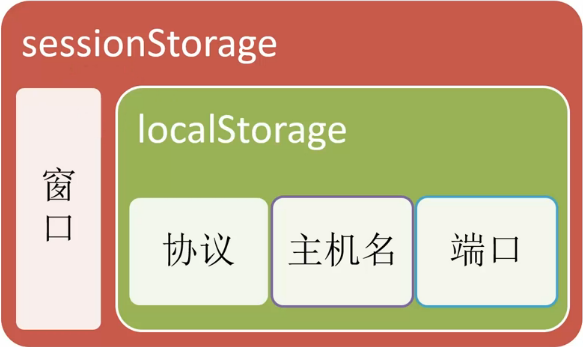
    <div id="name"></div>
    <div id="hello"></div>
    <script>
        if (typeof(Storage) !== "undefined") {
            localStorage.hello = "world"
            localStorage.setItem("name", "jiakunguo")
            sessionStorage.hello = "world"
            sessionStorage.setItem("name", "jiakunguo")
            document.getElementById("hello").innerHtml = localStorage.getItem("hello")
            document.getElementById("name").innerHtml = localStorage.name
            localStorage.removeItem("name")
            localStorage.clear()
        } else {
            window.alert(" your browser not support Storage !!")
        }
    </script>
    <div id="result"></div>
    <script>
        var w
        if (typeof(Worker) !== "undefined") {
            w = new Worker("example/html5/demo_worker.js")
            w.onmessage = function(event){
                document.getElementById("result").innerHTML = event.data
            }
        } else {
            console.log("your browser not support web Worker")
        }
    </script>
    <script>
        if (typeof(EventSource) !== "undefined") {
            var sse = new EventSource("https://mock-js.herokuapp.com/others/sse")
            sse.onmessage = function (event) {
                console.log(event.data)
            }
        } else {
            console.log(" not support event source")
        }
    </script>
    <!-- on node express server -->
    app.get('/sse', function (request, response) {
        response.status(200).set({
        "connection": "keep-alive",
        "cache-control": "no-cache",
        "content-Type": "text/event-stream"
    })

        response.write(`data: Hello SSE !!\n\n`)
    })
在上例中,我们使用 onmessage 事件来获取消息。不过还可以使用其他事件:
| 事件 | 描述 |
|---|---|
| onopen | 当通往服务器的连接被打开 |
| onmessage | 当接收到消息 |
| onerror | 当发生错误 |
https://www.chromestatus.com/feature/6192449487634432
<!DOCTYPE HTML>
<html manifest="demo.appcache">

<body>
文档内容 ......
</body>

</html>

<!-- demo.appcache -->
CACHE MANIFEST
# v1.0.0
/theme.css
/logo.gif
/main.js

NETWORK:
login.asp //or *

FALLBACK:
/html/ /offline.html // offline.html replace html dir all file
<script>
if (typeof(WebSocket !== 'undefine')) {
  var ws = new WebSocket('wss://mock-js.herokuapp.com')
  ws.onopen = function () {
    ws.send('hello server')
  }
  ws.onmessage = function (evt) {
    console.log("ws-> message from server: "+ evt.data)
    ws.close()
  }

  ws.onclose = function () {
    console.log('ws close')
  }
} else {
  console.log('your browser not support websocket')
}
</script>
<!-- on nodejs express server-->

var websocket = require('ws')
class WS {
    constructor (server) {
        this.server = server
    }
    handle() {
        var server = this.server
        var socketio = new websocket.Server({server})
        socketio.on('connection', async (socket)=> {
            console.log('a user connection to server')
            socket.on('message', (obj)=> {
                console.log('ws->frome clinet message: '+ obj)
                socket.send('hello client')
            })

            socket.on('close', ()=> {
                console.log('disconnect from client')
            })
        })
    }
}

module.exports = WS
https://www.npmjs.com/package/express-ws
https://socket.io/get-started/chat/#Introduction & https://github.com/socketio/socket.io-client
pagetop
Reference
EventProperty
urlcode
httpmessage
httpmethod
globalproperty
EventProperty
针对 window 对象触发的事件(应用到 <body> 标签):
| 属性 | 值 | 描述 |
|---|---|---|
| onafterprint | script | 文档打印之后运行的脚本。 |
| onbeforeprint | script | 文档打印之前运行的脚本。 |
| onbeforeunload | script | 文档卸载之前运行的脚本。 |
| onerror | script | 在错误发生时运行的脚本。 |
| onhaschange | script | 当文档已改变时运行的脚本。 |
| onload | script | 页面结束加载之后触发。 |
| onmessage | script | 在消息被触发时运行的脚本。 |
| onoffline | script | 当文档离线时运行的脚本。 |
| ononline | script | 当文档上线时运行的脚本。 |
| onpagehide | script | 当窗口隐藏时运行的脚本。 |
| onpageshow | script | 当窗口成为可见时运行的脚本。 |
| onpopstate | script | 当窗口历史记录改变时运行的脚本。 |
| onredo | script | 当文档执行撤销(redo)时运行的脚本。 |
| onresize | script | 当浏览器窗口被调整大小时触发。 |
| onstorage | script | 在 Web Storage 区域更新后运行的脚本。 |
| onundo | script | 在文档执行 undo 时运行的脚本。 |
| onunload | script | 一旦页面已下载时触发(或者浏览器窗口已被关闭)。 |
由 HTML 表单内的动作触发的事件(应用到几乎所有 HTML 元素,但最常用在 form 元素中):
| 属性 | 值 | 描述 |
|---|---|---|
| onblur | script | 元素失去焦点时运行的脚本。 |
| onchange | script | 在元素值被改变时运行的脚本。 |
| oncontextmenu | script | 当上下文菜单被触发时运行的脚本。 |
| onfocus | script | 当元素获得焦点时运行的脚本。 |
| onformchange | script | 在表单改变时运行的脚本。 |
| onforminput | script | 当表单获得用户输入时运行的脚本。 |
| oninput | script | 当元素获得用户输入时运行的脚本。 |
| oninvalid | script | 当元素无效时运行的脚本。 |
| onreset | script | 当表单中的重置按钮被点击时触发。HTML5 中不支持。 |
| onselect | script | 在元素中文本被选中后触发。 |
| onsubmit | script | 在提交表单时触发。 |
| 属性 | 值 | 描述 |
|---|---|---|
| onkeydown | script | 在用户按下按键时触发。 |
| onkeypress | script | 在用户敲击按钮时触发。 |
| onkeyup | script | 当用户释放按键时触发。 |
由鼠标或类似用户动作触发的事件:
| 属性 | 值 | 描述 |
|---|---|---|
| onclick | script | 元素上发生鼠标点击时触发。 |
| ondblclick | script | 元素上发生鼠标双击时触发。 |
| ondrag | script | 元素被拖动时运行的脚本。 |
| ondragend | script | 在拖动操作末端运行的脚本。 |
| ondragenter | script | 当元素元素已被拖动到有效拖放区域时运行的脚本。 |
| ondragleave | script | 当元素离开有效拖放目标时运行的脚本。 |
| ondragover | script | 当元素在有效拖放目标上正在被拖动时运行的脚本。 |
| ondragstart | script | 在拖动操作开端运行的脚本。 |
| ondrop | script | 当被拖元素正在被拖放时运行的脚本。 |
| onmousedown | script | 当元素上按下鼠标按钮时触发。 |
| onmousemove | script | 当鼠标指针移动到元素上时触发。 |
| onmouseout | script | 当鼠标指针移出元素时触发。 |
| onmouseover | script | 当鼠标指针移动到元素上时触发。 |
| onmouseup | script | 当在元素上释放鼠标按钮时触发。 |
| onmousewheel | script | 当鼠标滚轮正在被滚动时运行的脚本。 |
| onscroll | script | 当元素滚动条被滚动时运行的脚本。 |
由媒介(比如视频、图像和音频)触发的事件(适用于所有 HTML 元素,但常见于媒介元素中,比如 <audio>、<embed>、<img>、<object> 以及 <video>):
| 属性 | 值 | 描述 |
|---|---|---|
| onabort | script | 在退出时运行的脚本。 |
| oncanplay | script | 当文件就绪可以开始播放时运行的脚本(缓冲已足够开始时)。 |
| oncanplaythrough | script | 当媒介能够无需因缓冲而停止即可播放至结尾时运行的脚本。 |
| ondurationchange | script | 当媒介长度改变时运行的脚本。 |
| onemptied | script | 当发生故障并且文件突然不可用时运行的脚本(比如连接意外断开时)。 |
| onended | script | 当媒介已到达结尾时运行的脚本(可发送类似“感谢观看”之类的消息)。 |
| onerror | script | 当在文件加载期间发生错误时运行的脚本。 |
| onloadeddata | script | 当媒介数据已加载时运行的脚本。 |
| onloadedmetadata | script | 当元数据(比如分辨率和时长)被加载时运行的脚本。 |
| onloadstart | script | 在文件开始加载且未实际加载任何数据前运行的脚本。 |
| onpause | script | 当媒介被用户或程序暂停时运行的脚本。 |
| onplay | script | 当媒介已就绪可以开始播放时运行的脚本。 |
| onplaying | script | 当媒介已开始播放时运行的脚本。 |
| onprogress | script | 当浏览器正在获取媒介数据时运行的脚本。 |
| onratechange | script | 每当回放速率改变时运行的脚本(比如当用户切换到慢动作或快进模式)。 |
| onreadystatechange | script | 每当就绪状态改变时运行的脚本(就绪状态监测媒介数据的状态)。 |
| onseeked | script | 当 seeking 属性设置为 false(指示定位已结束)时运行的脚本。 |
| onseeking | script | 当 seeking 属性设置为 true(指示定位是活动的)时运行的脚本。 |
| onstalled | script | 在浏览器不论何种原因未能取回媒介数据时运行的脚本。 |
| onsuspend | script | 在媒介数据完全加载之前不论何种原因终止取回媒介数据时运行的脚本。 |
| ontimeupdate | script | 当播放位置改变时(比如当用户快进到媒介中一个不同的位置时)运行的脚本。 |
| onvolumechange | script | 每当音量改变时(包括将音量设置为静音)时运行的脚本。 |
| onwaiting | script | 当媒介已停止播放但打算继续播放时(比如当媒介暂停已缓冲更多数据)运行脚本 |
URL Code
| ASCII Value | URL-encode | ASCII Value | URL-encode | ASCII Value | URL-encode |
|---|---|---|---|---|---|
| æ | %00 | 0 | %30 | ` | %60 |
| %01 | 1 | %31 | a | %61 | |
| %02 | 2 | %32 | b | %62 | |
| %03 | 3 | %33 | c | %63 | |
| %04 | 4 | %34 | d | %64 | |
| %05 | 5 | %35 | e | %65 | |
| %06 | 6 | %36 | f | %66 | |
| %07 | 7 | %37 | g | %67 | |
| backspace | %08 | 8 | %38 | h | %68 |
| tab | %09 | 9 | %39 | i | %69 |
| linefeed | %0a | : | %3a | j | %6a |
| %0b | ; | %3b | k | %6b | |
| %0c | < | %3c | l | %6c | |
| c return | %0d | = | %3d | m | %6d |
| %0e | > | %3e | n | %6e | |
| %0f | ? | %3f | o | %6f | |
| %10 | @ | %40 | p | %70 | |
| %11 | A | %41 | q | %71 | |
| %12 | B | %42 | r | %72 | |
| %13 | C | %43 | s | %73 | |
| %14 | D | %44 | t | %74 | |
| %15 | E | %45 | u | %75 | |
| %16 | F | %46 | v | %76 | |
| %17 | G | %47 | w | %77 | |
| %18 | H | %48 | x | %78 | |
| %19 | I | %49 | y | %79 | |
| %1a | J | %4a | z | %7a | |
| %1b | K | %4b | { | %7b | |
| %1c | L | %4c | | | %7c | |
| %1d | M | %4d | } | %7d | |
| %1e | N | %4e | ~ | %7e | |
| %1f | O | %4f | %7f | ||
| space | %20 | P | %50 | € | %80 |
| ! | %21 | Q | %51 | %81 | |
| " | %22 | R | %52 | ‚ | %82 |
| # | %23 | S | %53 | ƒ | %83 |
| $ | %24 | T | %54 | „ | %84 |
| % | %25 | U | %55 | … | %85 |
| & | %26 | V | %56 | † | %86 |
| ' | %27 | W | %57 | ‡ | %87 |
| ( | %28 | X | %58 | ˆ | %88 |
| ) | %29 | Y | %59 | ‰ | %89 |
| * | %2a | Z | %5a | Š | %8a |
| + | %2b | [ | %5b | ‹ | %8b |
| , | %2c | \ | %5c | Π| %8c |
| - | %2d | ] | %5d | %8d | |
| . | %2e | ^ | %5e | Ž | %8e |
| / | %2f | _ | %5f | %8f |
| ASCII Value | URL-encode | ASCII Value | URL-encode | ASCII Value | URL-encode |
|---|---|---|---|---|---|
| %90 | À | %c0 | ð | %f0 | |
| ‘ | %91 | Á | %c1 | ñ | %f1 |
| ’ | %92 | Â | %c2 | ò | %f2 |
| “ | %93 | Ã | %c3 | ó | %f3 |
| ” | %94 | Ä | %c4 | ô | %f4 |
| • | %95 | Å | %c5 | õ | %f5 |
| – | %96 | Æ | %c6 | ö | %f6 |
| — | %97 | Ç | %c7 | ÷ | %f7 |
| ˜ | %98 | È | %c8 | ø | %f8 |
| ™ | %99 | É | %c9 | ù | %f9 |
| š | %9a | Ê | %ca | ú | %fa |
| › | %9b | Ë | %cb | û | %fb |
| œ | %9c | Ì | %cc | ü | %fc |
| %9d | Í | %cd | ý | %fd | |
| ž | %9e | Î | %ce | þ | %fe |
| Ÿ | %9f | Ï | %cf | ÿ | %ff |
| %a0 | Ð | %d0 | |||
| ¡ | %a1 | Ñ | %d1 | ||
| ¢ | %a2 | Ò | %d2 | ||
| £ | %a3 | Ó | %d3 | ||
| %a4 | Ô | %d4 | |||
| ¥ | %a5 | Õ | %d5 | ||
| | | %a6 | Ö | %d6 | ||
| § | %a7 | %d7 | |||
| ¨ | %a8 | Ø | %d8 | ||
| © | %a9 | Ù | %d9 | ||
| ª | %aa | Ú | %da | ||
| « | %ab | Û | %db | ||
| ¬ | %ac | Ü | %dc | ||
| ¯ | %ad | Ý | %dd | ||
| ® | %ae | Þ | %de | ||
| ¯ | %af | ß | %df | ||
| ° | %b0 | à | %e0 | ||
| ± | %b1 | á | %e1 | ||
| ² | %b2 | â | %e2 | ||
| ³ | %b3 | ã | %e3 | ||
| ´ | %b4 | ä | %e4 | ||
| µ | %b5 | å | %e5 | ||
| ¶ | %b6 | æ | %e6 | ||
| · | %b7 | ç | %e7 | ||
| ¸ | %b8 | è | %e8 | ||
| ¹ | %b9 | é | %e9 | ||
| º | %ba | ê | %ea | ||
| » | %bb | ë | %eb | ||
| ¼ | %bc | ì | %ec | ||
| ½ | %bd | í | %ed | ||
| ¾ | %be | î | %ee | ||
| ¿ | %bf | ï | %ef |
Http Message
| 消息: | 描述: |
|---|---|
| 100 Continue | 服务器仅接收到部分请求,但是一旦服务器并没有拒绝该请求,客户端应该继续发送其余的请求。 |
| 101 Switching Protocols | 服务器转换协议:服务器将遵从客户的请求转换到另外一种协议。 |
| 消息: | 描述: |
|---|---|
| 200 OK | 请求成功(其后是对GET和POST请求的应答文档。) |
| 201 Created | 请求被创建完成,同时新的资源被创建。 |
| 202 Accepted | 供处理的请求已被接受,但是处理未完成。 |
| 203 Non-authoritative Information | 文档已经正常地返回,但一些应答头可能不正确,因为使用的是文档的拷贝。 |
| 204 No Content | 没有新文档。浏览器应该继续显示原来的文档。如果用户定期地刷新页面,而Servlet可以确定用户文档足够新,这个状态代码是很有用的。 |
| 205 Reset Content | 没有新文档。但浏览器应该重置它所显示的内容。用来强制浏览器清除表单输入内容。 |
| 206 Partial Content | 客户发送了一个带有Range头的GET请求,服务器完成了它。 |
| 消息: | 描述: |
|---|---|
| 300 Multiple Choices | 多重选择。链接列表。用户可以选择某链接到达目的地。最多允许五个地址。 |
| 301 Moved Permanently | 所请求的页面已经转移至新的url。 |
| 302 Found | 所请求的页面已经临时转移至新的url。 |
| 303 See Other | 所请求的页面可在别的url下被找到。 |
| 304 Not Modified | 未按预期修改文档。客户端有缓冲的文档并发出了一个条件性的请求(一般是提供If-Modified-Since头表示客户只想比指定日期更新的文档)。服务器告诉客户,原来缓冲的文档还可以继续使用。 |
| 305 Use Proxy | 客户请求的文档应该通过Location头所指明的代理服务器提取。 |
| 306 Unused | 此代码被用于前一版本。目前已不再使用,但是代码依然被保留。 |
| 307 Temporary Redirect | 被请求的页面已经临时移至新的url。 |
| 消息: | 描述: |
|---|---|
| 400 Bad Request | 服务器未能理解请求。 |
| 401 Unauthorized | 被请求的页面需要用户名和密码。 |
| 402 Payment Required | 此代码尚无法使用。 |
| 403 Forbidden | 对被请求页面的访问被禁止。 |
| 404 Not Found | 服务器无法找到被请求的页面。 |
| 405 Method Not Allowed | 请求中指定的方法不被允许。 |
| 406 Not Acceptable | 服务器生成的响应无法被客户端所接受。 |
| 407 Proxy Authentication Required | 用户必须首先使用代理服务器进行验证,这样请求才会被处理。 |
| 408 Request Timeout | 请求超出了服务器的等待时间。 |
| 409 Conflict | 由于冲突,请求无法被完成。 |
| 410 Gone | 被请求的页面不可用。 |
| 411 Length Required | "Content-Length" 未被定义。如果无此内容,服务器不会接受请求。 |
| 412 Precondition Failed | 请求中的前提条件被服务器评估为失败。 |
| 413 Request Entity Too Large | 由于所请求的实体的太大,服务器不会接受请求。 |
| 414 Request-url Too Long | 由于url太长,服务器不会接受请求。当post请求被转换为带有很长的查询信息的get请求时,就会发生这种情况。 |
| 415 Unsupported Media Type | 由于媒介类型不被支持,服务器不会接受请求。 |
| 416 | 服务器不能满足客户在请求中指定的Range头。 |
| 417 Expectation Failed |
| 消息: | 描述: |
|---|---|
| 500 Internal Server Error | 请求未完成。服务器遇到不可预知的情况。 |
| 501 Not Implemented | 请求未完成。服务器不支持所请求的功能。 |
| 502 Bad Gateway | 请求未完成。服务器从上游服务器收到一个无效的响应。 |
| 503 Service Unavailable | 请求未完成。服务器临时过载或当机。 |
| 504 Gateway Timeout | 网关超时。 |
| 505 HTTP Version Not Supported | 服务器不支持请求中指明的HTTP协议版本。 |
Http Method
| GET | POST | |
|---|---|---|
| 后退按钮/刷新 | 无害 | 数据会被重新提交(浏览器应该告知用户数据会被重新提交)。 |
| 书签 | 可收藏为书签 | 不可收藏为书签 |
| 缓存 | 能被缓存 | 不能缓存 |
| 编码类型 | application/x-www-form-urlencoded | application/x-www-form-urlencoded 或 multipart/form-data。为二进制数据使用多重编码。 |
| 历史 | 参数保留在浏览器历史中。 | 参数不会保存在浏览器历史中。 |
| 对数据长度的限制 | 是的。当发送数据时,GET 方法向 URL 添加数据;URL 的长度是受限制的(URL 的最大长度是 2048 个字符)。 | 无限制。 |
| 对数据类型的限制 | 只允许 ASCII 字符。 | 没有限制。也允许二进制数据。 |
| 安全性 | 与 POST 相比,GET 的安全性较差,因为所发送的数据是 URL 的一部分。 在发送密码或其他敏感信息时绝不要使用 GET ! |
POST 比 GET 更安全,因为参数不会被保存在浏览器历史或 web 服务器日志中。 |
| 可见性 | 数据在 URL 中对所有人都是可见的。 | 数据不会显示在 URL 中。 |
<a href="http://baidu.com" accesskey="h">HTML</a><br />
<a href="http://bing.com" accesskey="c">CSS</a>
注释:请使用Alt + accessKey (或者 Shift + Alt + accessKey) 来访问带有指定快捷键的元素。
<p contenteditable="true"> hello world</p>
hello world
<script>
function showDetails(animal) {
    var animalType = animal.getAttribute("data-animal-type");
    alert(animal.innerHTML + "是一种" + animalType + "。");
}
</script>
<ul>
  <li onclick="showDetails(this)" id="owl" data-animal-type="鸟类">喜鹊</li>
  <li onclick="showDetails(this)" id="salmon" data-animal-type="鱼类">金枪鱼</li>
  <li onclick="showDetails(this)" id="tarantula" data-animal-type="蜘蛛">蝇虎</li>
</ul>
点击某个物种来查看其类别:
https://www.w3school.com.cn/tags/att_global_data.asp
<p dir="rtl">Write this text right-to-left!</p>
Write this text right-to-left!
https://www.w3school.com.cn/tags/att_standard_dir.asp
<script type="text/javascript">
function allowDrop(ev)
{
ev.preventDefault();
}

function drag(ev)
{
ev.dataTransfer.setData("Text",ev.target.id);
}

function drop(ev)
{
var data=ev.dataTransfer.getData("Text");
ev.target.appendChild(document.getElementById(data));
ev.preventDefault();
}
</script>
<div id="div1" ondrop="drop(event)" ondragover="allowDrop(event)"></div>
<br />
<p id="drag1" draggable="true" ondragstart="drag(event)">这是一段可移动的段落。请把该段落拖入上面的矩形。</p>
这是一段可移动的段落。请把该段落拖入上面的矩形。
<p hidden> hidden </p>
hidden
<a href="http://www.w3school.com.cn/" tabindex="2">W3School</a>
<a href="http://www.google.com/" tabindex="1">Google</a>
<a href="http://www.microsoft.com/" tabindex="3">Microsoft</a>
<abbr title="People's Republic of China">PRC</abbr> was founded in 1949.
<p title="Free Web tutorials">W3School.com.cn</p>
PRC was founded in 1949.
W3School.com.cn
Html Element
!doctype
a
abbr
acronym
address
applet
area
article
aside
audio
b
base
basefont
bdi
big
blockquote
body
br
button
canvas
caption
center
cite
code
col
colgroup
command
details
dd
del
dir
div
dialog
em
embed
fieldset
figcaption
figure
font
footer
form
frame
frameset
h1
head
header
hr
i
iframe
img
input
ins
kbd
keygen
label
legend
li
link
main
map
mark
menu
menuitem
meta
meter
nav
noframes
noscript
object
ol
optgroup
option
output
p
param
pre
progress
q
rp
s
samp
script
section
select
small
source
span
strike
strong
style
sub
summary
sup
table
tbody
td
textarea
tfoot
th
thead
time
title
tr
track
ul
video
wbr
5np: means label has new property in html5 version, you can checkout link below every example
5n: means new label in html5 version , you can checkout link below every example
X: not support in html5 OR not suggest use
<!--...-->define comment
define document type
<!DOCTYPE html> #define this document is belong html5
define anchor
<a href="http://www.w3school.com.cn">W3School</a>
https://www.w3school.com.cn/tags/tag_a.asp
topdefine abbreviation
The <abbr title="People's Republic of China">PRC</abbr> was founded in 1949.
The PRC was founded in 1949.
https://www.w3school.com.cn/tags/tag_abbr.asp
toplike abbr label; not support in html5
<acronym title="World Wide Web">WWW</acronym>
WWW
https://www.w3school.com.cn/tags/tag_acronym.asp
topdefine author and contact
<address>
Written by <a href="mailto:[email protected]">Donald Duck</a>.<br>
Visit us at:<br>
Example.com<br>
Box 564, Disneyland<br>
USA
</address>
https://www.w3school.com.cn/tags/tag_address.asp
topdefine embed applet, not suggest use, not support in html5, please replace by object
<applet code="Bubbles.class" width="350" height="350">
Java applet that draws animated bubbles.
</applet>
https://www.w3school.com.cn/tags/tag_applet.asp
topdefine picture maping area
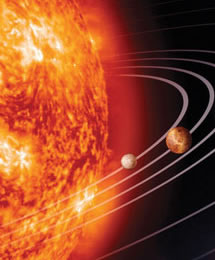
<img src="https://www.w3school.com.cn/i/eg_planets.jpg" border="0" usemap="#planetmap" alt="Planets" />

<map name="planetmap" id="planetmap">
  <area shape="circle" coords="180,139,14" href ="venus.html" alt="Venus" />
  <area shape="circle" coords="129,161,10" href ="mercur.html" alt="Mercury" />
  <area shape="rect" coords="0,0,110,260" href ="sun.html" alt="Sun" />
</map>
https://www.w3school.com.cn/tags/tag_area.asp
topdefine article post blog newspaper comment
<article>
  <h1>Internet Explorer 9</h1>
  <p>Windows Internet Explorer 9(简称 IE9)于 2011 年 3 月 14 日发布.....</p>
</article>
Windows Internet Explorer 9(简称 IE9)于 2011 年 3 月 14 日发布.....
https://www.w3school.com.cn/tags/tag_article.asp
topdefine outside of the page content, artile's sidebar
<p>Me and my family visited The Epcot center this summer.</p>
<aside>
<h4>Epcot Center</h4>
The Epcot Center is a theme park in Disney World, Florida.
</aside>
Me and my family visited The Epcot center this summer.
https://www.w3school.com.cn/tags/tag_aside.asp
topdefint sound content
<audio src="/i/horse.ogg" controls="controls">
Your browser does not support the audio element.
</audio>
https://www.w3school.com.cn/tags/tag_audio.asp
topdefint bold font
<b>hello world!!</b>
hello world!!
topdefine all of the link default arm in page
<head>
<base href="http://www.w3school.com.cn/i/" />
<base target="_blank" />
</head>

<body>
<img src="eg_smile.gif" />
<a href="http://www.w3school.com.cn">W3School</a>
</body>
https://www.w3school.com.cn/tags/tag_base.asp
topdefine default font family color and size, not suggest use,please replace by css style
<head>
<basefont color="red" size="5" />
</head>

<body>
<h1>This is a header</h1>
<p>This is a paragraph</p>
</body>
defint text direction
<ul>
   <li><bdo dir="rtl">Username <bdi dir="ltr">Bill</bdi>:80 points</bdo></li>
   <li>Username <bdi>Steve</bdi>: 78 points</li>
</ul>
https://www.w3school.com.cn/tags/tag_bdi.asp
topdeine big text
<big>hello</big>
hello
https://www.w3school.com.cn/tags/tag_font_style.asp
topdefine long quote
<blockquote>
Here is a long quotation here is a long quotation here is a long quotation
here is a long quotation here is a long quotation here is a long quotation
here is a long quotation here is a long quotation here is a long quotation.
</blockquote>
Here is a long quotation here is a long quotation here is a long quotation here is a long quotation here is a long quotation here is a long quotation here is a long quotation here is a long quotation here is a long quotation.
https://www.w3school.com.cn/tags/tag_blockquote.asp
toptopdefine main document
define change line char
<br> # in xhtml <br />
11
11
define a button
<button type="button">Click Me!</button>
https://www.w3school.com.cn/tags/tag_button.asp
topdefine graph
<canvas id="myCanvas"></canvas>

<script type="text/javascript">

var canvas=document.getElementById('myCanvas');
var ctx=canvas.getContext('2d');
ctx.fillStyle='#FF0000';
ctx.fillRect(0,0,80,100);

</script>
https://www.w3school.com.cn/tags/tag_canvas.asp
topdefine table title
<table border="1">
  <caption>Monthly savings</caption>
  <tr>
    <th>Month</th>
    <th>Savings</th>
  </tr>
  <tr>
    <td>January</td>
    <td>$100</td>
  </tr>
</table>
| Month | Savings |
|---|---|
| January | $100 |
https://www.w3school.com.cn/tags/tag_caption.asp
topalian text to center, not suggest use
<center></center>
define quote <cite> 标签通常表示它所包含的文本对某个参考文献的引用,比如书籍或者杂志的标题。按照惯例,引用的文本将以斜体显示。用 <cite> 标签把指向其他文档的引用分离出来,尤其是分离那些传统媒体中的文档,如书籍、杂志、期刊,等等。如果引用的这些文档有联机版本,还应该把引用包括在一个 <a> 标签中,从而把一个超链接指向该联机版本。 <cite> 标签还有一个隐藏的功能:它可以使你或者其他人从文档中自动摘录参考书目。我们可以很容易地想象一个浏览器,它能够自动整理引用表格,并把它们作为脚注或者独立的文档来显示。<cite> 标签的语义已经远远超过了改变它所包含的文本外观的作用;它使浏览器能够以各种实用的方式来向用户表达文档的内容。
<a href="#"><cite>this is a title</cite></a>
define code text
<code>
# include <stdio.h>
int main(){printf("hello world!!");return 0;}
</code>
# include <stdio.h>
int main(){printf("hello world!!");return 0;}
define muti col
<table width="100%" border="1">
  <col align="left" />
  <col align="left" />
  <col align="right" />
  <tr>
    <th>ISBN</th>
    <th>Title</th>
    <th>Price</th>
  </tr>
  <tr>
    <td>3476896</td>
    <td>My first HTML</td>
    <td>$53</td>
  </tr>
</table>
| ISBN | Title | Price |
|---|---|---|
| 3476896 | My first HTML | $53 |
https://www.w3school.com.cn/tags/tag_col.asp
topColumn groups in the table for formatting
<table width="100%" border="1">
  <colgroup span="2" align="left"></colgroup>
  <colgroup align="right" style="color:#0000FF;"></colgroup>
  <tr>
    <th>ISBN</th>
    <th>Title</th>
    <th>Price</th>
  </tr>
  <tr>
    <td>3476896</td>
    <td>My first HTML</td>
    <td>$53</td>
  </tr>
</table>
| ISBN | Title | Price |
|---|---|---|
| 3476896 | My first HTML | $53 |
define command buttons
<menu>
<command onclick="alert('Hello World')">
Click Me!</command>
</menu>
define dropdown list
<details open>
<summary>hello</summary>
<p>ALl pages</p>
</details>
hello
All pages
https://www.w3school.com.cn/tags/tag_details.asp
topDefine the description of the items in the list
<dl>
   <dt>计算机</dt>
   <dd>用来计算的仪器 ... ...</dd>
   <dt>显示器</dt>
   <dd>以视觉方式显示信息的装置 ... ...</dd>
</dl>
https://www.w3school.com.cn/tags/tag_dd.asp
topdefine delete text
a dozen is <del>20</del> 12 pieces
a dozen is 20 12 pieces
https://www.w3school.com.cn/tags/tag_del.asp
topdefine Directory List
<dir>
   <li>HTML</li>
   <li>XHTML</li>
   <li>CSS</li>
</dir>
define Sections in the document
<div style="color:#00FF00">
  <h3>This is a header</h3>
  <p>This is a paragraph.</p>
</div>
This is a paragraph.
https://www.w3school.com.cn/tags/tag_div.asp
topdefine Dialog or window
<table border="1">
<tr>
  <th>一月 <dialog open>这是打开的对话窗口</dialog></th>
  <th>二月</th>
  <th>三月</th>
</tr>
<tr>
  <td>31</td>
  <td>28</td>
  <td>31</td>
</tr>
</table>
| 一月 | 二月 | 三月 |
|---|---|---|
| 31 | 28 | 31 |
https://www.w3school.com.cn/tags/tag_dialog.asp
topdefine stress text
<em>hello</em>
hello
topdefine Embedded content
<embed src="helloworld.swf" />
https://www.w3school.com.cn/tags/tag_embed.asp
topdefine The border around the elements in the form
<form>
  <fieldset>
    <legend>health information</legend>
    height: <input type="text" />
    weight: <input type="text" />
  </fieldset>
</form>
https://www.w3school.com.cn/tags/tag_fieldset.asp
topdefine figure element title
<figure>
  <figcaption>黄浦江上的的卢浦大桥</figcaption>
  <!-- <img src="shanghai_lupu_bridge.jpg" width="350" height="234" /> -->
</figure>
https://www.w3school.com.cn/tags/tag_figcaption.asp
topdefine Grouping of media content and their titles
<figure>
  <p>黄浦江上的的卢浦大桥</p>
  <!-- <img src="shanghai_lupu_bridge.jpg" width="350" height="234" /> -->
</figure>
黄浦江上的的卢浦大桥
https://www.w3school.com.cn/tags/tag_figure.asp
topnot suggest use
<font size="3" color="red">This is some text!</font>
<font size="2" color="blue">This is some text!</font>
<font face="verdana" color="green">This is some text!</font>
This is some text! This is some text! This is some text!
https://www.w3school.com.cn/tags/tag_font.asp
topdefine page tail
<footer>
  <p>Posted by: W3School</p>
  <p>Contact information: <a href="mailto:[email protected]">[email protected]</a>.</p>
</footer>
https://www.w3school.com.cn/tags/tag_footer.asp
topdefine HTML form entered by the user
<form action="form_action.asp" method="get">
  <p>First name: <input type="text" name="fname" /></p>
  <p>Last name: <input type="text" name="lname" /></p>
  <input type="submit" value="Submit" />
</form>
https://www.w3school.com.cn/tags/tag_form.asp
topdefine frame page
<html>

<frameset cols="25%,50%,25%">
  <frame src="frame_a.htm" />
  <frame src="frame_b.htm" />
  <frame src="frame_c.htm" />
</frameset>

</html>
define frame set
<frameset cols="25%,50%,25%">
  <frame src="frame_a.htm" />
  <frame src="frame_b.htm" />
  <frame src="frame_c.htm" />
</frameset>
https://www.w3school.com.cn/tags/tag_frameset.asp
top<h1>这是标题 1</h1>
<h2>这是标题 2</h2>
<h3>这是标题 3</h3>
<h4>这是标题 4</h4>
<h5>这是标题 5</h5>
<h6>这是标题 6</h6>
<head>
  <title>文档的标题</title>
</head>
define section or page head
<header>
<h1>Welcome to my homepage</h1>
<p>My name is Donald Duck</p>
</header>

<p>The rest of my home page...</p>
My name is Donald Duck
The rest of my home page...
https://www.w3school.com.cn/tags/tag_header.asp
topdefine Horizontal line
<h1>This is header 1</h1>
<hr />
<p>This is some text</p>
This is some text
https://www.w3school.com.cn/tags/tag_hr.asp
tophello
topdefine Inline frame
<iframe src ="/index.html" align="right">
<p>Your browser does not support iframes.</p>
</iframe>
https://www.w3school.com.cn/tags/tag_iframe.asp
topdefine image
<img src="/i/eg_tulip.jpg" alt="上海鲜花港 - 郁金香" />

https://www.w3school.com.cn/tags/tag_img.asp
topdefine input control
<form action="form_action.asp" method="get">
  First name: <input type="text" name="fname" />
  Last name: <input type="text" name="lname" />
  <input type="submit" value="Submit" />
</form>
https://www.w3school.com.cn/tags/tag_input.asp
topdefine text inserted
a dozen is <del>20</del> <ins>12</ins> pieces
a dozen is 20 12 pieces
https://www.w3school.com.cn/tags/tag_ins.asp
tophttps://www.w3school.com.cn/tags/tag_kbd.asp
topdefine encrypt form submit
<form action="demo_keygen.asp" method="get">
Username: <input type="text" name="usr_name" />
Encryption: <keygen name="security" />
<input type="submit" />
</form>
https://www.w3school.com.cn/tags/tag_keygen.asp
topdefine label of input element
<form>
  <label for="male">Male</label>
  <input type="radio" name="sex" id="male" />
  <br />
  <label for="female">Female</label>
  <input type="radio" name="sex" id="female" />
</form>
https://www.w3school.com.cn/tags/tag_label.asp
topdefine the title of the fieldset element
<form>
  <fieldset>
    <legend>health information</legend>
    height: <input type="text" />
    weight: <input type="text" />
  </fieldset>
</form>
https://www.w3school.com.cn/tags/tag_legend.asp
topdefine display list of project
<ol>
   <li>Coffee</li>
   <li>Tea</li>
   <li>Milk</li>
</ol>

<ul>
   <li>Coffee</li>
   <li>Tea</li>
   <li>Milk</li>
</ul>
https://www.w3school.com.cn/tags/tag_li.asp
topdefine the contact of the document and outside resource
<link rel="stylesheet" type="text/css" href="theme.css" />
define document only one element
<!DOCTYPE html>
<html>
<body>

<main>
  <h1>Web Browsers</h1>
  <p>Google Chrome、Firefox 以及 Internet Explorer 是目前最流行的浏览器。</p>

  <article>
    <h1>Google Chrome</h1>
    <p>Google Chrome 是由 Google 开发的一款免费的开源 web 浏览器,于 2008 年发布。</p>
  </article>

  <article>
    <h1>Internet Explorer</h1>
    <p>Internet Explorer 由微软开发的一款免费的 web 浏览器,发布于 1995 年。</p>
  </article>

  <article>
    <h1>Mozilla Firefox</h1>
    <p>Firefox 是一款来自 Mozilla 的免费开源 web 浏览器,发布于 2004 年。</p>
  </article>
</main>

</body>
</html>
define picture mapping
<img src="planets.jpg" border="0" usemap="#planetmap" alt="Planets" />

<map name="planetmap" id="planetmap">
  <area shape="circle" coords="180,139,14" href ="venus.html" alt="Venus" />
  <area shape="circle" coords="129,161,10" href ="mercur.html" alt="Mercury" />
  <area shape="rect" coords="0,0,110,260" href ="sun.html" alt="Sun" />
</map>

https://www.w3school.com.cn/tags/tag_map.asp
tophightlight some text
<p>Do not forget to buy <mark>milk</mark> today.</p>
Do not forget to buy milk today.
https://www.w3school.com.cn/tags/tag_mark.asp
topdefine list or menu
<menu type="toolbar">
 <li>
 <menu label="File">
 <button type="button" onclick="file_new()">New...</button>
 <button type="button" onclick="file_open()">Open...</button>
 <button type="button" onclick="file_save()">Save</button>
 </menu>
 </li>
 <li>
 <menu label="Edit">
 <button type="button" onclick="edit_cut()">Cut</button>
 <button type="button" onclick="edit_copy()">Copy</button>
 <button type="button" onclick="edit_paste()">Paste</button>
 </menu>
 </li>
</menu>
<menu type="context" id="mymenu">
  <menuitem label="Refresh" onclick="window.location.reload();" icon="ico_reload.png">
  </menuitem>
  <menu label="Share on...">
    <menuitem label="Twitter" icon="ico_twitter.png"
    onclick="window.open('//twitter.com/intent/tweet?text='+window.location.href);">
    </menuitem>
    <menuitem label="Facebook" icon="ico_facebook.png"
    onclick="window.open('//facebook.com/sharer/sharer.php?u='+window.location.href);">
    </menuitem>
  </menu>
  <menuitem label="Email This Page"
  onclick="window.location='mailto:?body='+window.location.href;"></menuitem>
</menu>
元素可提供有关页面的元信息(meta-information),比如针对搜索引擎和更新频度的描述和关键词
<meta name="keywords" content="HTML,ASP,PHP,SQL">
<meta http-equiv="charset" content="iso-8859-1">
<meta http-equiv="expires" content="31 Dec 2008">
使用 meter 元素来度量给定范围(gauge)内的数据
<meter value="3" min="0" max="10">十分之三</meter>

<meter value="0.6">60%</meter>
define nav link
<nav>
<a href="index.asp">Home</a>
<a href="html5_meter.asp">Previous</a>
<a href="html5_noscript.asp">Next</a>
</nav>
<frameset cols = "25%, 25%,*">
  <noframes>
  <body>Your browser does not handle frames!</body>
  </noframes>
  <frame src ="venus.htm" />
  <frame src   ="sun.htm" />
  <frame src ="mercur.htm"   />
</frameset>
<body>
  ...
  ...

  <script type="text/javascript">
    <!--
    document.write("Hello World!")
    //-->
  </script>

  <noscript>Your browser does not support JavaScript!</noscript>
  ...
  ...
</body>
define a embed object
<object classid="clsid:F08DF954-8592-11D1-B16A-00C0F0283628" id="Slider1"
width="100" height="50">
  <param name="BorderStyle" value="1" />
  <param name="MousePointer" value="0" />
  <param name="Enabled" value="1" />
  <param name="Min" value="0" />
  <param name="Max" value="10" />
</object>
define a rulely list
<ol>
  <li>Coffee</li>
  <li>Tea</li>
  <li>Milk</li>
</ol>
<select>
  <optgroup label="Swedish Cars">
    <option value ="volvo">Volvo</option>
    <option value ="saab">Saab</option>
  </optgroup>

  <optgroup label="German Cars">
    <option value ="mercedes">Mercedes</option>
    <option value ="audi">Audi</option>
  </optgroup>
</select>
top
<select>
  <option value ="volvo">Volvo</option>
  <option value ="saab">Saab</option>
  <option value="opel">Opel</option>
  <option value="audi">Audi</option>
</select>
define different type output
<form oninput="x.value=parseInt(a.value)+parseInt(b.value)">0
   <input type="range" id="a" value="50">100
   +<input type="number" id="b" value="50">
   =<output name="x" for="a b"></output>
</form>
define a paragraph
<p>This is some text in a very short paragraph</p>
This is some text in a very short paragraph
top<object classid="clsid:F08DF954-8592-11D1-B16A-00C0F0283628" id="Slider1"
width="100" height="50">
<param name="BorderStyle" value="1" />
<param name="MousePointer" value="0" />
<param name="Enabled" value="1" />
<param name="Min" value="0" />
<param name="Max" value="10" />
</object>
可定义预格式化的文本。被包围在 pre 元素中的文本通常会保留空格和换行符
<pre>
<html>
<head>
<script type="text/javascript" src="loadxmldoc.js">
</script>
</head>
<body>
<script type="text/javascript">
xmlDoc=<a href="dom_loadxmldoc.asp">loadXMLDoc</a>("books.xml");
document.write("xmlDoc is loaded, ready for use");
</script>
</body>
</html>
</pre>
<html>

<head>
  <script type="text/javascript" src="loadxmldoc.js">
</script>
</head>

<body>

  <script type="text/javascript">
    xmlDoc=loadXMLDoc("books.xml");
    document.write("xmlDoc is loaded, ready for use");
  </script>

</body>

</html>
top
<progress value="22" max="100"></progress>
<q>Here is a short quotation here is a short quotation</q>
Here is a short quotation here is a short quotation
<ruby>
漢 <rt><rp>(</rp>ㄏㄢˋ<rp>)</rp></rt>
</ruby>
漢
top<s> no support</s>
no support
define computer code
<samp>printf("hello world!!")</samp>
printf("hello world!!")
top<script type="text/javascript">
document.write("Hello World!")
</script>
标签定义文档中的节(section、区段)。比如章节、页眉、页脚或文档中的其他部分。
<section>
  <h1>PRC</h1>
  <p>The People's Republic of China was born in 1949...</p>
</section>
The People's Republic of China was born in 1949...
<select>
  <option value ="volvo">Volvo</option>
  <option value ="saab">Saab</option>
  <option value="opel">Opel</option>
  <option value="audi">Audi</option>
</select>
<small> hello </small>hello
hello hello
top<audio controls>
<source src="horse.ogg" type="audio/ogg">
<source src="horse.mp3" type="audio/mpeg">
Your browser does not support the audio element.
</audio>
<span>hello </span>
hello
toptoplike <s></s>
<strong>hello</strong>
hello
top<html>
<head>
<style type="text/css">
h1 {color:red}
p {color:blue}
</style>
</head>
<body>
<h1>Header 1</h1>
<p>A paragraph.</p>
</body>
</html>
hello<sub>hello</sub>
hellohello
top<details>
<summary>HTML 5</summary>
This document teaches you everything you have to learn about HTML 5.
</details>
HTML 5
This document teaches you everything you have to learn about HTML 5.
hello<sup>hello</sup>
hellohello
top<table border="1">
<tr>
<th>Month</th>
<th>Savings</th>
</tr>
<tr>
<td>January</td>
<td>$100</td>
</tr>
</table>
| Month | Savings |
|---|---|
| January | $100 |
<table border="1">
<thead>
<tr>
<th>Month</th>
<th>Savings</th>
</tr>
</thead>
<tfoot>
<tr>
<td>Sum</td>
<td>$180</td>
</tr>
</tfoot>
<tbody>
<tr>
<td>January</td>
<td>$100</td>
</tr>
<tr>
<td>February</td>
<td>$80</td>
</tr>
</tbody>
</table>
| Month | Savings |
|---|---|
| Sum | $180 |
| January | $100 |
| February | $80 |
<table border="1">
  <tr>
    <th>Month</th>
    <th>Savings</th>
  </tr>
  <tr>
    <td>January</td>
    <td>$100</td>
  </tr>
</table>
| Month | Savings |
|---|---|
| January | $100 |
https://www.w3school.com.cn/tags/index.asp
top<textarea rows="3" cols="20">
在w3school,你可以找到你所需要的所有的网站建设教程。
</textarea>
https://www.w3school.com.cn/tags/tag_textarea.asp
top<table border="1">
<thead>
<tr>
<th>Month</th>
<th>Savings</th>
</tr>
</thead>
<tfoot>
<tr>
<td>Sum</td>
<td>$180</td>
</tr>
</tfoot>
<tbody>
<tr>
<td>January</td>
<td>$100</td>
</tr>
<tr>
<td>February</td>
<td>$80</td>
</tr>
</tbody>
</table>
| Month | Savings |
|---|---|
| Sum | $180 |
| January | $100 |
| February | $80 |
<table border="1">
<tr>
<th>Company</th>
<th>Address</th>
</tr>
<tr>
<td>Apple, Inc.</td>
<td>1 Infinite Loop Cupertino, CA 95014</td>
</tr>
</table>
| Company | Address |
|---|---|
| Apple, Inc. | 1 Infinite Loop Cupertino, CA 95014 |
<table border="1">
  <thead>
    <tr>
      <th>Month</th>
      <th>Savings</th>
    </tr>
  </thead>

  <tfoot>
    <tr>
      <td>Sum</td>
      <td>$180</td>
    </tr>
  </tfoot>

  <tbody>
    <tr>
      <td>January</td>
      <td>$100</td>
    </tr>
    <tr>
      <td>February</td>
      <td>$80</td>
    </tr>
  </tbody>
</table>
| Month | Savings |
|---|---|
| Sum | $180 |
| January | $100 |
| February | $80 |
<p>我们在每天早上 <time>9:00</time> 开始营业。</p>
<p>我在 <time datetime="2008-02-14">情人节</time> 有个约会。</p>
我们在每天早上 开始营业。
我在 有个约会。
top<html>
<head>
<title>XHTML Tag Reference</title>
</head>
<body>
The content of the document......
</body>
</html>
<table border="1">
  <tr>
    <th>Month</th>
    <th>Savings</th>
  </tr>
  <tr>
    <td>January</td>
    <td>$100</td>
  </tr>
</table>
| Month | Savings |
|---|---|
| January | $100 |
<track> 标签为诸如 video 元素之类的媒介规定外部文本轨道。用于规定字幕文件或其他包含文本的文件,当媒介播放时,这些文件是可见的。
<video width="320" height="240" controls="controls">
  <source src="forrest_gump.mp4" type="video/mp4" />
  <source src="forrest_gump.ogg" type="video/ogg" />
  <track kind="subtitles" src="subs_chi.srt" srclang="zh" label="Chinese">
  <track kind="subtitles" src="subs_eng.srt" srclang="en" label="English">
</video>
<ul>
  <li>Coffee</li>
  <li>Tea</li>
  <li>Milk</li>
</ul>
<video src="/i/movie.ogg" controls="controls">
your browser does not support the video tag
</video>
<p>
如果想学习 AJAX,那么您必须熟悉 XML<wbr>Http<wbr>Request 对象。
</p>
如果想学习 AJAX,那么您必须熟悉 XML
CSS (Cascading Style Sheets)
Base
h1,h2,h3,h4,h5,h6 {
  color: green;
  }
body {
     font-family: Verdana, sans-serif;
     }
li strong {
    font-style: italic;
    font-weight: normal;
  }
#red {color:red;}
#green {color:green;}

<p id="red">这个段落是红色。</p>
<p id="green">这个段落是绿色。</p>
.center {text-align: center}
| 选择器 | 描述 |
|---|---|
| [attribute] | 用于选取带有指定属性的元素。 |
| [attribute=value] | 用于选取带有指定属性和值的元素。 |
| [attribute~=value] | 用于选取属性值中包含指定词汇的元素。 |
| [attribute|=value] | 用于选取带有以指定值开头的属性值的元素,该值必须是整个单词。 |
| [attribute^=value] | 匹配属性值以指定值开头的每个元素。 |
| [attribute$=value] | 匹配属性值以指定值结尾的每个元素。 |
| [attribute*=value] | 匹配属性值中包含指定值的每个元素。 |
<head>
<link rel="stylesheet" type="text/css" href="mystyle.css" />
</head>
<head>
<style type="text/css">
  hr {color: sienna;}
  p {margin-left: 20px;}
  body {background-image: url("images/back40.gif");}
</style>
</head>
<p style="color: sienna; margin-left: 20px">
This is a paragraph
</p>
Style
<div style="width: 50px;height: 50px;background-color: red;"></div>
<div style="width:300px;height:300px;background-image: url('https://avatars0.githubusercontent.com/u/57088477?s=300&v=4');"></div>
<div style="width:300px;height:300px;background-image: url('https://avatars0.githubusercontent.com/u/57088477?s=88&v=4');background-repeat: repeat-y;"></div>
<div style="width:300px;height:300px;background-image: url('https://avatars0.githubusercontent.com/u/57088477?s=88&v=4');border: 1px solid black;background-repeat: no-repeat; background-position: 250px 50%"></div>
- 长度值解释的是元素内边距区左上角的偏移。偏移点是图像的左上角
- 如果图像位于 0% 0%,其左上角将放在元素内边距区的左上角。如果图像位置是 100% 100%,会使图像的右下角放在右边距的右下角
<div style="width:300px;height:300px;border: 1px solid black;overflow: scroll"><div style="width: 200px;height: 400px;font-size: 100px;background-image: url('https://avatars0.githubusercontent.com/u/57088477?s=88&v=4');background-repeat: no-repeat;background-attachment: scroll">1</div></div>
fixme: background-attachment: fixed; the background image will dispear
background-attachment 属性的默认值是 scroll,也就是说,在默认的情况下,背景会随文档滚动。
<div style="width:300px;height:300px;border: 1px solid black;background: red url('https://avatars0.githubusercontent.com/u/57088477?s=88&v=4') no-repeat center"></div>
| 属性 | 描述 |
|---|---|
| color | 设置文本颜色 |
| direction | 设置文本方向。 |
| line-height | 设置行高。 |
| letter-spacing | 设置字符间距。 |
| text-align | 对齐元素中的文本。 |
| text-decoration | 向文本添加修饰。 |
| text-indent | 缩进元素中文本的首行。 |
| text-shadow | 设置文本阴影。CSS2 包含该属性,但是 CSS2.1 没有保留该属性。 |
| text-transform | 控制元素中的字母。 |
| unicode-bidi | 设置文本方向。 |
| white-space | 设置元素中空白的处理方式。 |
| word-spacing | 设置字间距。 |
<div style="font-family: Times, TimesNR, 'New Century Schoolbook',
     Georgia, 'New York', serif">hello world!!</div>
<div style="font-style: italic">hello world!!</div>
<div style="font-variant: small-caps">hello world!!</div>
<div style="font-weight: 900">hello world!!</div>
this website already set font-size: 62.5% on root element
<div style="font-size: 20px;border: 1px solid black">
  <div style="font-size: 20px">
    hello world!!(20px)
  </div>
  <div style="font-size: 1em">
    hello world!!(1em)
  </div>
  <div style="font-size:2em">
    hello world!!(2em)
  </div>
  <div style="font-size: 16px">
    hello world!!(16px)
  </div>
  <div style="font-size: 1.6rem">
    hello world!!(1.6rem)
  </div>
</div>
a:link {color:#FF0000;}		/* 未被访问的链接 */
a:visited {color:#00FF00;}	/* 已被访问的链接 */
a:hover {color:#FF00FF;}	/* 鼠标指针移动到链接上 */
a:active {color:#0000FF;}	/* 正在被点击的链接 */
<ul style="list-style-type: decimal">
<li>hello</li>
<li>world</li>
</ul>
<ul style="list-style-type: devimal;list-style-image: url('https://www.w3school.com.cn/i/eg_arrow.gif')">
<li>hello</li>
<li>world</li>
</ul>
<ul style="list-style-type: devimal;list-style-image: url('https://www.w3school.com.cn/i/eg_arrow.gif');list-style-position: inside">
<li>hello</li>
<li>world</li>
</ul>
<ul style="list-style:url('https://www.w3school.com.cn/i/eg_arrow.gif') inside">
<li>hello</li>
<li>world</li>
</ul>
<table style="border: 1px solid blue">
<tr>
<th style="border: 1px solid blue">0</th><th>1</th>
</tr>
<tr>
<td style="border: 1px solid blue">2</td><td>3</td>
</tr>
</table>
| 0 | 1 |
|---|---|
| 2 | 3 |
<table style="border: 1px solid blue;border-collapse: collapse">
<tr>
<th style="border: 1px solid blue">0</th><th>1</th>
</tr>
<tr>
<td style="border: 1px solid blue">2</td><td>3</td>
</tr>
</table>
| 0 | 1 |
|---|---|
| 2 | 3 |
<p style="border: red solid thin;outline: #00ff00 dotted thick">hello world!!</p>
hello world!!
<div style="background-color: green;color: white;width: 85%;height: 100px;overflow: scroll">
<p>这里的文本内容是可以滚动的,滚动条方向是垂直方向。</p>
<p>这里的文本内容是可以滚动的,滚动条方向是垂直方向。</p>
<p>这里的文本内容是可以滚动的,滚动条方向是垂直方向。</p>
<p>这里的文本内容是可以滚动的,滚动条方向是垂直方向。</p>
<p>这里的文本内容是可以滚动的,滚动条方向是垂直方向。</p>
<p>这里的文本内容是可以滚动的,滚动条方向是垂直方向。</p>
</div>
这里的文本内容是可以滚动的,滚动条方向是垂直方向。
这里的文本内容是可以滚动的,滚动条方向是垂直方向。
这里的文本内容是可以滚动的,滚动条方向是垂直方向。
这里的文本内容是可以滚动的,滚动条方向是垂直方向。
这里的文本内容是可以滚动的,滚动条方向是垂直方向。
这里的文本内容是可以滚动的,滚动条方向是垂直方向。
| 值 | 描述 |
|---|---|
| visible | 默认值。内容不会被修剪,会呈现在元素框之外。 |
| hidden | 内容会被修剪,并且其余内容是不可见的。 |
| scroll | 内容会被修剪,但是浏览器会显示滚动条以便查看其余的内容。 |
| auto | 如果内容被修剪,则浏览器会显示滚动条以便查看其余的内容。 |
| inherit | 规定应该从父元素继承 overflow 属性的值。 |
CSS Box Model

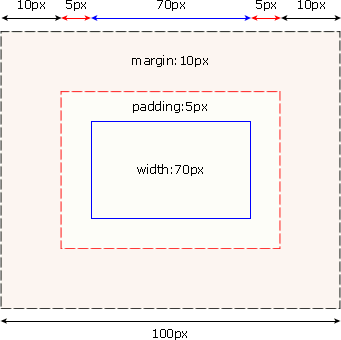
<div style="width: 150px;padding: 10px;background-color: green;"><div style="background-color: red">padding: 10px</div</div>
<div>hello</div>
<div style="margin: 0 0 0 2cm">hello world!!</div>
<div style="margin-bottom: 20px">hello</div>
<div style="margin-top: 10px">world</div>
外边距合并指的是,当两个垂直外边距相遇时,它们将形成一个外边距。
合并后的外边距的高度等于两个发生合并的外边距的高度中的较大者。
CSS Positioning
div、h1 或 p 元素常常被称为块级元素。这意味着这些元素显示为
一块内容,即“块框”。与之相反,span 和 strong 等元素称为“行
内元素”,这是因为它们的内容显示在行中,即“行内框”。

您可以使用 display 属性改变生成的框的类型。这意味着,通过将
 display 属性设置为 block,可以让行内元素(比如 <a> 元素)
 表现得像块级元素一样。还可以通过把 display 设置为 none,
 让生成的元素根本没有框。这样的话,该框及其所有内容就不再显示
 ,不占用文档中的空间。

但是在一种情况下,即使没有进行显式定义,也会创建块级元素。这种
情况发生在把一些文本添加到一个块级元素(比如 div)的开头。即
使没有把这些文本定义为段落,它也会被当作段落对待:
<div>
some text
<p>Some more text.</p>
</div>
在这种情况下,这个框称为无名块框,因为它不与专门定义的元素相关联。
块级元素的文本行也会发生类似的情况。假设有一个包含三行文本的段落
。每行文本形成一个无名框。无法直接对无名块或行框应用样式,因为没
有可以应用样式的地方(注意,行框和行内框是两个概念)。但是,这有
助于理解在屏幕上看到的所有东西都形成某种框。
CSS 有三种基本的定位机制:普通流、浮动和绝对定位。

除非专门指定,否则所有框都在普通流中定位。也就是说,
普通流中的元素的位置由元素在 (X)HTML 中的位置决定。

块级框从上到下一个接一个地排列,框之间的垂直距离是由框
的垂直外边距计算出来。

行内框在一行中水平布置。可以使用水平内边距、边框和
外边距调整它们的间距。但是,垂直内边距、边框和外边
距不影响行内框的高度。由一行形成的水平框称为行框
(Line Box),行框的高度总是足以容纳它包含的所有行
内框。不过,设置行高可以增加这个框的高度。
1. static
元素框正常生成。块级元素生成一个矩形框,作为文档流的一部分,行内元素则会创建一个或多个行框,置于其父元素中。
2. relative
元素框偏移某个距离。元素仍保持其未定位前的形状,它原本所占的空间仍保留。
3. absolute
元素框从文档流完全删除,并相对于其包含块定位。包含块可能是文档中的另一
个元素或者是初始包含块。元素原先在正常文档流中所占的空间会关闭,就好像
元素原来不存在一样。元素定位后生成一个块级框,而不论原来它在正常流中生
成何种类型的框。
4. fixed
元素框的表现类似于将 position 设置为 absolute,不过其包含块是视窗本身。
#box_relative {
  position: relative;
  left: 30px;
  top: 20px;
}
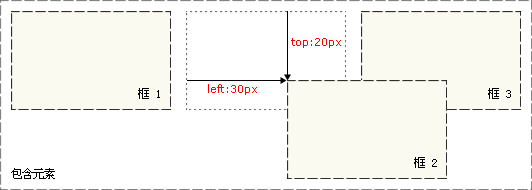
注意,在使用相对定位时,无论是否进行移动,元素仍然占据原来的空间。因此,移动元素会导致它覆盖其它框。
<div style="width: 200px;height: 100px;position: relative;left: 0;top: 0">
  <div style="width: 50px;height: 60px;background-color: red;float: left"></div>
  <div style="position: absolute;top: 10px;left: 0px;width: 50px;height: 60px;background-color: green;float: left"></div>
  <div style="width: 50px;height: 60px;background-color: blue;float: left"></div>
</div>
绝对定位的元素的位置相对于最近的已定位祖先元素,如果元素没有已定位的祖先元素,那么它的位置相对于最初的包含块。
相对定位是“相对于”元素在文档中的初始位置,而绝对定位是“相对于”最近的已定位祖先元素,如果不存在已定位的祖先元素,那么“相对于”最初的包含块。
<div style="width: 100px;height: 100px;background-color: red;position: fixed; top: 100px;left: 100px"></div>
<div style="width: 200px;height: 200px;position: relative;left: 0;top: 0;border: 1px solid black">
  <div style="width: 50px;height: 60px;background-color: red;float: left"></div>
  <div style="width: 50px;height: 60px;background-color: green;float: left"></div>
  <div style="width: 50px;height: 60px;background-color: blue;float: right"></div>
  <div style="width: 50px;height: 70px;background-color: grey;clear: both"></div>
</div>
CSS Selector
<p class="important warning">
This paragraph is a very important warning.
</p>
<style>
.important {font-weight:bold;}
.warning {font-style:italic;}
.important.warning {background:silver;}
</style>
<style>
  div.descendantselector-red {
    width: 100px;
    height: 100px;
    background-color: red;
}
div.descendantselector-green {
    width: 100px;
    height: 100px;
    background-color: green;
}
.descendantselector-red span {
    color: white
}
.descendantselector-green span {
    color: white;
}
</style>
<div>
  <div class="descendantselector-red"></div>
  <div class="descendantselector-green"></div>
</div>
<style>
  .childselector ul > li {
    list-style-type: decimal;
}
</style>
<div class="childselector">
  <ul>
    <li>hello</li>
    <li>world</li>
  </ul>
</div>
<style>
.brotherselector ul > li + li{
    font-weight: bold;
}

.brotherselector ul + ol > li {
    font-weight: 900;
}
</style>
<div class="brotherselector">
<ul>
  <li>hello</li>
  <li>world</li>
</ul>
<ol>
  <li>hello</li>
  <li>world</li>
</ol>
</div>
选择紧接在另一个元素后的元素,而且二者有相同的父元素
| 属性 | 描述 | CSS |
|---|---|---|
| :active | 向被激活的元素添加样式。 | 1 |
| :focus | 向拥有键盘输入焦点的元素添加样式。 | 2 |
| :hover | 当鼠标悬浮在元素上方时,向元素添加样式。 | 1 |
| :link | 向未被访问的链接添加样式。 | 1 |
| :visited | 向已被访问的链接添加样式。 | 1 |
| :first-child | 向元素的第一个子元素添加样式。 | 2 |
| :lang | 向带有指定 lang 属性的元素添加样式。 | 2 |
| 属性 | 描述 | CSS |
|---|---|---|
| :first-letter | 向文本的第一个字母添加特殊样式。 | 1 |
| :first-line | 向文本的首行添加特殊样式。 | 1 |
| :before | 在元素之前添加内容。 | 2 |
| :after | 在元素之后添加内容。 | 2 |
CSS Upgrade
<div style="width: 200px;height: 50px;background-color: red;">
  <div style="margin: auto;width: 100px;height: 40px;background-color: green;"></div>
</div>
| 属性 | 描述 |
|---|---|
| height | 设置元素的高度。 |
| line-height | 设置行高。 |
| max-height | 设置元素的最大高度。 |
| max-width | 设置元素的最大宽度。 |
| min-height | 设置元素的最小高度。 |
| min-width | 设置元素的最小宽度。 |
| width | 设置元素的宽度。 |
| 属性 | 描述 |
|---|---|
| clear | 设置一个元素的侧面是否允许其他的浮动元素。 |
| cursor | 规定当指向某元素之上时显示的指针类型。 |
| display | 设置是否及如何显示元素。 |
| float | 定义元素在哪个方向浮动。 |
| position | 把元素放置到一个静态的、相对的、绝对的、或固定的位置中。 |
| visibility | 设置元素是否可见或不可见。 |
<div><img style="opacity: 0.5" src="https://www.w3school.com.cn/i/tulip_peach_blossom_w_s.jpg" /></div>

<style>
body {
    counter-reset: section;
}
#counter > h5 {
    counter-reset: subsection;
}
#counter > h5::before {
    counter-increment: section;
    content: "Section " counter(section) ".";
}
#counter > h6::before {
    counter-increment: subsection;
    content: counter(section) "." counter(subsection) ".";
}
</style>
<div id="counter">
  <h5>hello</h5>
    <h6>hello</h6>
    <h6>hello</h6>
  <h5>world</h5>
    <h6>world</h6>
    <h6>world</h6>
  <h5>!!</h5>
    <h6>!!</h6>
    <h6>!!</h6>
</div>
| 值 | 说明 |
|---|---|
| none | 设置Content,如果指定成Nothing |
| normal | 设置content,如果指定的话,正常,默认是"none"(该是nothing) |
| counter | 设定计数器内容 |
| attr(attribute) | 设置Content作为选择器的属性之一。 |
| string | 设置Content到你指定的文本 |
| open-quote | 设置Content是开口引号 |
| close-quote | 设置Content是闭合引号 |
| no-open-quote | 如果指定,移除内容的开始引号 |
| no-close-quote | 如果指定,移除内容的闭合引号 |
| url(url) | 设置某种媒体(图像,声音,视频等内容) |
| inherit | 指定的content属性的值,应该从父元素继承 |
CSS3
<div style="width: 200px;height: 100px;background-color: red;border-radius: 25px"></div>
border-top-left-radius: 2em 0.5em;
border-top-right-radius: 1em 3em;
border-bottom-right-radius: 4em 0.5em;
border-bottom-left-radius: 1em 3em;
| 值 | 描述 | 测试 |
|---|---|---|
| h-shadow | 必需。水平阴影的位置。允许负值。 | 测试 |
| v-shadow | 必需。垂直阴影的位置。允许负值。 | 测试 |
| blur | 可选。模糊距离。 | 测试 |
| spread | 可选。阴影的尺寸。 | 测试 |
| color | 可选。阴影的颜色。请参阅 CSS 颜色值。 | 测试 |
| inset | 可选。将外部阴影 (outset) 改为内部阴影。 | 测试 |
<div style="width: 200px;height: 100px;background-color: red;box-shadow: 10px 10px 10px #888"></div>
#round {
    border-image: url(/example/css3/border.png) 30 30 round !important;
    width: 300px;
    border: 15px solid transparent;
}
<div id="round">
在这里,图片铺满整个边框。
</div>
https://developer.mozilla.org/zh-CN/docs/Web/CSS/border-image-slice
<div style="width: 100px;height: 100px;background-image: url('https://avatars0.githubusercontent.com/u/57088477?s=50&v=4');background-repeat: no-repeat;background-size: 80px;border: 1px solid black"></div>
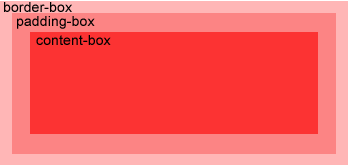
<div style="width: 50px;height: 50px;padding: 50px;border: 1px solid black;background-image: url('https://www.runoob.com/try/demo_source/smiley.gif');background-repeat: no-repeat;background-position: left;background-origin: border-box">hello world!!</div>

<div style="width: 50px;height: 50px;padding: 50px;border: 1px solid black;background-image: url('https://www.runoob.com/try/demo_source/smiley.gif');background-repeat: no-repeat;background-position: left;background-origin: content-box">hello world!!</div>
CSS3 允许你在元素上添加多个背景图像
<div style="width: 100px;height: 100px;background: url('https://www.runoob.com/images/compatible_chrome.gif') center, url('https://www.runoob.com/try/demo_source/smiley.gif');background-repeat: no-repeat;border: 1px solid black"></div>
CSS3中background-clip背景剪裁属性是从指定位置开始绘制
<div style="width: 100px; height: 100px; padding: 20px; border: 1px solid black; background: red; background-clip: content-box">hello world</div>
<span style="text-shadow: 5px 5px 5px #FF0000;">hello world !!</span>
hello world !!
<div style="">
<p style="width: 40px;height:50px;border: 1px solid black">
ffffffffff
</p>
<p style="width: 40px;height:50px;border: 1px solid black;word-wrap: break-word">
ffffffffff
</p>
</div>
ffffffffff
ffffffffff
| 属性 | 描述 | CSS |
|---|---|---|
| hanging-punctuation | 规定标点字符是否位于线框之外。 | 3 |
| punctuation-trim | 规定是否对标点字符进行修剪。 | 3 |
| text-align-last | 设置如何对齐最后一行或紧挨着强制换行符之前的行。 | 3 |
| text-emphasis | 向元素的文本应用重点标记以及重点标记的前景色。 | 3 |
| text-justify | 规定当 text-align 设置为 "justify" 时所使用的对齐方法。 | 3 |
| text-outline | 规定文本的轮廓。 | 3 |
| text-overflow | 规定当文本溢出包含元素时发生的事情。 | 3 |
| text-shadow | 向文本添加阴影。 | 3 |
| text-wrap | 规定文本的换行规则。 | 3 |
| word-break | 规定非中日韩文本的换行规则。 | 3 |
| word-wrap | 允许对长的不可分割的单词进行分割并换行到下一行。 | 3 |
default 从上到下
<div style="background-image: linear-gradient(red, blue); width:100px;height:100px;"></div>
从左到右 to right, to top, to bottom, to bottom right, to left
<div style="background-image: linear-gradient(to right, red, blue);width:100px;height:100px"></div>
角度是指水平线和渐变线之间的角度,逆时针方向计算。换句话说,0deg 将创建一个从下到上的渐变,90deg 将创建一个从左到右的渐变。
<div style="background-image: linear-gradient(-90deg, red, blue);width:100px;height:100px"></div>
使用 rgba() 函数来定义颜色结点。rgba() 函数中的最后一个参数可以是从 0 到 1 的值,它定义了颜色的透明度:0 表示完全透明,1 表示完全不透明。
<div style="background-image: linear-gradient(to right, rgba(255, 0, 0, 0), rgba(255, 0, 0, 1));width:100px;height:100px"></div>
<div style="background-image: repeating-linear-gradient(red, yellow 10%, green 20%);width:100px;height:100px"></div>
<div style="background-image: radial-gradient(red, yellow, green);width:100px;height:100px"></div>
<div style="background-image: radial-gradient(red 5%, yellow 15%, green 60%);width:100px;height:100px"></div>
设置形状:shape 参数定义了形状。它可以是值 circle 或 ellipse。其中,circle 表示圆形,ellipse 表示椭圆形。默认值是 ellipse.
<div style="background-image: radial-gradient(circle, red, yellow, green);width:100px;height:100px"></div>
<div id="diyfont">
  <p>hello world !!</p>
  <span>hello world!!</span>
<div>
<style>
@font-face {
    font-family: runoobfont;
    src: url('/example/css3/Sansation_Light.ttf');
}

#diyfont > p {
    font-family: runoobfont;
}
</style>
hello world !!
hello world!!<div style="transform: rotate(30deg);background-color: red;width:100px;height:100px"></div>
<div style="transform: translate(50px, 20px);width:100px;height:100px;background-color: red;"></div>
通过 scale() 方法,元素的尺寸会增加或减少,根据给定的宽度(X 轴)和高度(Y 轴)参数
<div style="transform: scale(2, 1);width:100px;height:100px;background-color: red;"></div>
<div style="border-left: 1px solid black;border-bottom: 1px solid black;width: 150px;height: 150px;position: relative;"><div style=";width:100px;height:100px;background-color: red;position: absolute;left: 0;bottom: 0;"></div></div>
<br />

<div style="border-left: 1px solid black;border-bottom: 1px solid black;width: 150px;height: 150px;position: relative;"><div style="transform: skew(30deg, 20deg);width:100px;height:100px;background-color: red;position: absolute;left: 0;bottom: 0;"></div></div>
值 skew(30deg,20deg) 围绕 X 轴把元素翻转 30 度,围绕 Y 轴翻转 20 度。 https://developer.mozilla.org/zh-CN/docs/Web/CSS/transform-function/skew
matrix( scaleX(), skewY(), skewX(), scaleY(), translateX(), translateY() )
<div style="transform: matrix(1,0.5,-0.5,0.866,0,0);background-color: red;width:100px;height:100px">1</div>
https://developer.mozilla.org/pt-BR/docs/Web/CSS/transform-function/matrix
https://www.runoob.com/cssref/css3-pr-transform-origin.html
https://www.w3school.com.cn/example/css3/demo_css3_transform-origin.html
transation: [transition-property, transition-duration, transition-timing-function,transition-delay]
.trans:hover {
    width: 300px;
    transform: rotate(720deg);
}
.trans {
    transition: width 3s linear 2s,transform 2s;
    width:100px;
    height:100px;
    background-color: red;
}
<div class="trans" style=""></div>
animation: name duration timing-function delay iteration-count direction;
| 值 | 描述 | 测试 |
|---|---|---|
| linear | 动画从头到尾的速度是相同的。 | 测试 |
| ease | 默认。动画以低速开始,然后加快,在结束前变慢。 | 测试 |
| ease-in | 动画以低速开始。 | 测试 |
| ease-out | 动画以低速结束。 | 测试 |
| ease-in-out | 动画以低速开始和结束。 | 测试 |
| cubic-bezier(n,n,n,n) | 在 cubic-bezier 函数中自己的值。可能的值是从 0 到 1 的数值。 |
| 值 | 描述 | 测试 |
|---|---|---|
| n | 定义动画播放次数的数值。 | 测试 |
| infinite | 规定动画应该无限次播放。 | 测试 |
| 值 | 描述 | 测试 |
|---|---|---|
| normal | 默认值。动画应该正常播放。 | 测试 |
| alternate | 动画应该轮流反向播放。 | 测试 |
@keyframes mymove {
0% { width: 200px;}
100% {width: 400px;}
}
.movemove {
    animation: mymove 2s linear 1s infinite alternate;
}
<div class="movemove" style="width:100px;height:100px;background-color: red"></div>
CSS3 创建多列
<div style="column-count: 3;">
xxx
</div>
CSS3 多列中列与列间的间隙
<div style="column-gap: 10px;column-count: 3;">
xxx
</div>
指定了列与列间的边框样式
<div style="column-gap: 10px;column-count: 3;column-rule: 5px solid red;">
xxx
</div>
| 属性 | 描述 |
|---|---|
| column-count | 指定元素应该被分割的列数。 |
| column-fill | 指定如何填充列 |
| column-gap | 指定列与列之间的间隙 |
| column-rule | 所有 column-rule-* 属性的简写 |
| column-rule-color | 指定两列间边框的颜色 |
| column-rule-style | 指定两列间边框的样式 |
| column-rule-width | 指定两列间边框的厚度 |
| column-span | 指定元素要跨越多少列 |
| column-width | 指定列的宽度 |
| columns | 设置 column-width 和 column-count 的简写 |
指定一个div元素,允许用户调整大小
<div style="resize: both;border: 1px solid black;overflow:auto;">
行将就木时,我突然意识到:如果一开始我仅仅去改变我自己,
</div>
box-sizing 最主要的用法是规定容器元素的最终尺寸计算方式. 如果你创造了一个 <div> 没有设置 box-sizing 属性为 border-box(不设置的话默认值为 content-box.),同 你 设置 width:100px; border:10px solid red; padding:10px; 那么最终 div 容器的实际宽度为:
100px(width)+2*10px*(padding)+2*10px(border)=140px
所以你会得到一个比你预期(100px)还要更大的容器,结果就是会破坏网页布局。
注意:容易 margin 的尺寸不会被计算入最终容器宽度,因为对他的定义为对这个容器的留白,但不属于容器本身。 如果当我们定义一个容器的
box-sizing属性为border-box时(表达式:br{box-sizing:border-box}),那么我们创建一个和上段中相同设置的 <div> 容器时,那么他的最终宽度即为 100px, 那么它的内容部分(content)的有效宽度变成了100px-2*10px-2*10px =60px; 所以你会得到一个你预期大小的盒子容器,但是只是被压缩了内容部分尺寸而已,但是对于整体布局而言益处颇多
<div style="width:200px;height:100px;background-color: red;">
<div style="width: 100px;height: 100px;background-color: green;box-sizing: border-box;border: 10px solid black;padding: 10px;overflow: scroll;">
</div>
</div>
对轮廓进行偏移,并在超出边框边缘的位置绘制轮廓。
<div style="outline:1px solid red;outline-offset: 10px;border: 1px solid black;width: 100px;height: 100px"></div>
display: flex
<div style="display: flex;flex-direction: row;width: 300px;height: 200px;border: 1px solid black">
<div style="width: 50px;height: 50px;background-color: red;margin-left: 10px;"></div>
<div style="width: 50px;height: 50px;background-color: black;margin-left: 10px;"></div>
<div style="width: 50px;height: 50px;background-color: green;margin-left: 10px;"></div>
<div style="width: 50px;height: 50px;background-color: green;margin-left: 10px;"></div>
<div style="width: 50px;height: 50px;background-color: green;margin-left: 10px;"></div>
<div style="width: 50px;height: 50px;background-color: green;margin-left: 10px;"></div>
<div style="width: 50px;height: 50px;background-color: green;margin-left: 10px;"></div>
<div style="width: 50px;height: 50px;background-color: green;margin-left: 10px;"></div>
<div style="width: 50px;height: 50px;background-color: green;margin-left: 10px;"></div>
</div>
把弹性项沿着弹性容器的主轴线(main axis)对齐
<div style="display: flex;flex-direction: row;justify-content: space-around;width: 300px;height: 200px;border: 1px solid black">
<div style="width: 50px;height: 50px;background-color: red;"></div>
<div style="width: 50px;height: 50px;background-color: black;"></div>
<div style="width: 50px;height: 50px;background-color: green;"></div>
<div style="width: 50px;height: 50px;background-color: green;"></div>
</div>
flex-start: 弹性项目向行头紧挨着填充。这个是默认值。第一个弹性项的main-start外边距边线被放置在该行的main-start边线,而后续弹性项依次平齐摆放。
flex-end: 弹性项目向行尾紧挨着填充。第一个弹性项的main-end外边距边线被放置在该行的main-end边线,而后续弹性项依次平齐摆放。
center: 弹性项目居中紧挨着填充。(如果剩余的自由空间是负的,则弹性项目将在两个方向上同时溢出)。
space-between: 弹性项目平均分布在该行上。如果剩余空间为负或者只有一个弹性项,则该值等同于flex-start。否则,第1个弹性项的外边距和行的main-start边线对齐,而最后1个弹性项的外边距和行的main-end边线对齐,然后剩余的弹性项分布在该行上,相邻项目的间隔相等。
space-around: 弹性项目平均分布在该行上,两边留有一半的间隔空间。如果剩余空间为负或者只有一个弹性项,则该值等同于center。否则,弹性项目沿该行分布,且彼此间隔相等(比如是20px),同时首尾两边和弹性容器之间留有一半的间隔(1/2*20px=10px)。
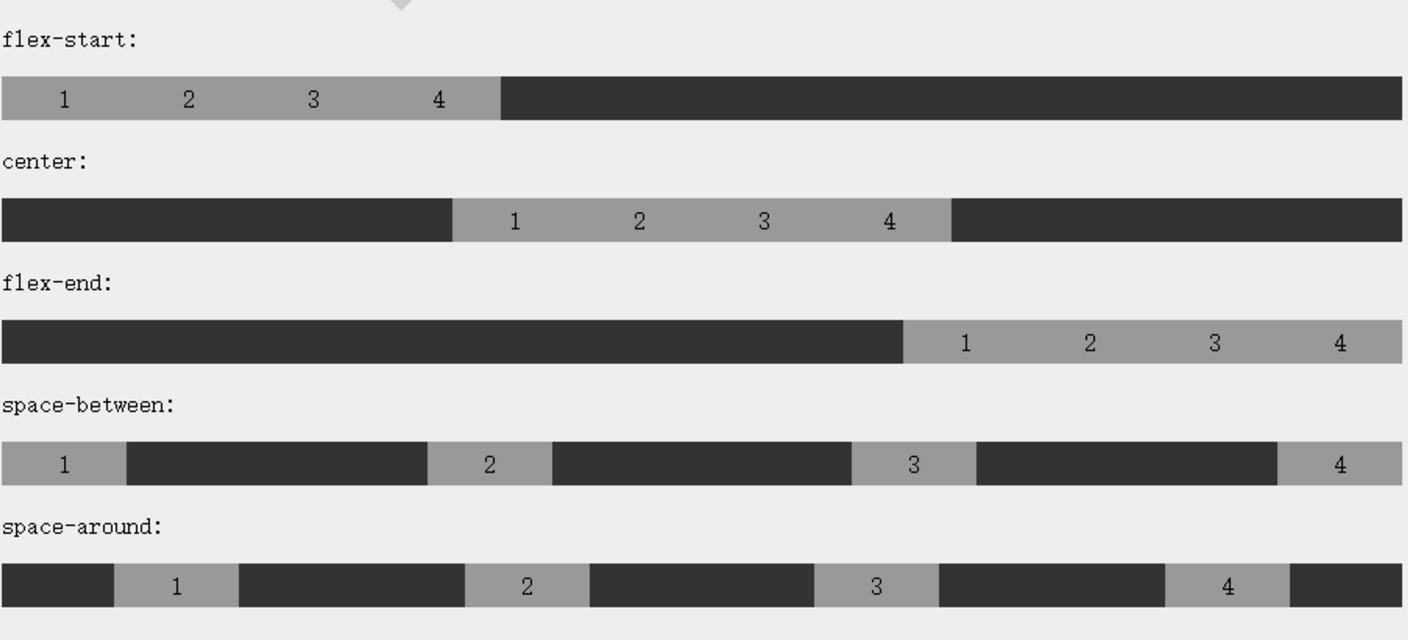
设置或检索弹性盒子元素在侧轴(纵轴)方向上的对齐方式。
<div style="display: flex;flex-direction: column;justify-content: space-around;align-items: center;width: 300px;height: 300px;border: 1px solid black">
<div style="width: 50px;height: 50px;background-color: red;"></div>
<div style="width: 50px;height: 50px;background-color: black;"></div>
<div style="width: 50px;height: 50px;background-color: green;"></div>
<div style="width: 50px;height: 50px;background-color: green;"></div>
</div>
指定弹性盒子的子元素换行方式
<div style="display: flex;flex-direction: row;flex-wrap: wrap;width: 300px;height: 200px;border: 1px solid black">
<div style="width: 50px;height: 50px;background-color: red;margin-left: 10px;"></div>
<div style="width: 50px;height: 50px;background-color: black;margin-left: 10px;"></div>
<div style="width: 50px;height: 50px;background-color: green;margin-left: 10px;"></div>
<div style="width: 50px;height: 50px;background-color: green;margin-left: 10px;"></div>
<div style="width: 50px;height: 50px;background-color: green;margin-left: 10px;"></div>
<div style="width: 50px;height: 50px;background-color: green;margin-left: 10px;"></div>
<div style="width: 50px;height: 50px;background-color: green;margin-left: 10px;"></div>
<div style="width: 50px;height: 50px;background-color: green;margin-left: 10px;"></div>
<div style="width: 50px;height: 50px;background-color: green;margin-left: 10px;"></div>
</div>
用于修改 flex-wrap 属性的行为。类似于 align-items, 但它不是设置弹性子元素的对齐,而是设置各个行的对齐。
<div style="display: flex;flex-direction: row;flex-wrap: wrap;align-content:center;width: 300px;height: 200px;border: 1px solid black">
<div style="width: 50px;height: 50px;background-color: red;margin-left: 10px;"></div>
<div style="width: 50px;height: 50px;background-color: black;margin-left: 10px;"></div>
<div style="width: 50px;height: 50px;background-color: green;margin-left: 10px;"></div>
<div style="width: 50px;height: 50px;background-color: green;margin-left: 10px;"></div>
<div style="width: 50px;height: 50px;background-color: green;margin-left: 10px;"></div>
<div style="width: 50px;height: 50px;background-color: green;margin-left: 10px;"></div>
<div style="width: 50px;height: 50px;background-color: green;margin-left: 10px;"></div>
<div style="width: 50px;height: 50px;background-color: green;margin-left: 10px;"></div>
<div style="width: 50px;height: 50px;background-color: green;margin-left: 10px;"></div>
</div>
用整数值来定义排列顺序,数值小的排在前面。可以为负值
<div style="display: flex;flex-direction: column;justify-content: space-around;align-items: center;width: 300px;height: 300px;border: 1px solid black">
<div style="width: 50px;height: 50px;background-color: red;"></div>
<div style="width: 50px;height: 50px;background-color: black;"></div>
<div style="width: 50px;height: 50px;background-color: green;"></div>
<div style="width: 50px;height: 50px;background-color: green;order: -1"></div>
</div>
<div style="display: flex;width: 300px;height: 200px;border: 1px solid black">
<div style="width: 50px;height: 50px;background-color: green;margin-left: 10px;color: white;align-self:flex-start">flex-start</div>
<div style="width: 50px;height: 50px;background-color: green;margin-left: 10px;color: white;align-self:flex-end">flex-end</div>
<div style="width: 50px;height: 50px;background-color: green;margin-left: 10px;color: white;align-self:center">center</div>
<div style="width: 50px;height: 50px;background-color: green;margin-left: 10px;color: white;align-self:baseline">baseline</div>
<div style="width: 50px;height: 50px;background-color: green;margin-left: 10px;color: white;align-self:stretch">stretch</div>
</div>
flex: auto | initial | none | inherit | [ flex-grow ] || [ flex-shrink ] || [ flex-basis ]
<div style="display: flex;width:200px;height: 100px;border: 1px solid black">
<div style="background-color: red;flex: 2"></div>
<div style="background-color: green;flex: 1"></div>
</div>
| 属性 | 描述 |
|---|---|
| display | 指定 HTML 元素盒子类型。 |
| flex-direction | 指定了弹性容器中子元素的排列方式 |
| justify-content | 设置弹性盒子元素在主轴(横轴)方向上的对齐方式。 |
| align-items | 设置弹性盒子元素在侧轴(纵轴)方向上的对齐方式。 |
| flex-wrap | 设置弹性盒子的子元素超出父容器时是否换行。 |
| align-content | 修改 flex-wrap 属性的行为,类似 align-items, 但不是设置子元素对齐,而是设置行对齐 |
| flex-flow | flex-direction 和 flex-wrap 的简写 |
| order | 设置弹性盒子的子元素排列顺序。 |
| align-self | 在弹性子元素上使用。覆盖容器的 align-items 属性。 |
| flex | 设置弹性盒子的子元素如何分配空间。 |
@media not|only mediatype and (expressions) {
    CSS 代码...;
}
@media screen and (min-width: 1000px ) { 大于 1000 像素
    .mediaTest {
        width: 200px;
        height: 200px;
        background-color: red;
    }
}

@media  screen and (max-width: 1000px) { //小于 1000 像素的设备上修改背景颜色
    .mediaTest {
        width: 200px;
        height: 200px;
        background-color: black;
    }
}
<div class="mediaTest">

</div>
| 值 | 描述 |
|---|---|
| aspect-ratio | 定义输出设备中的页面可见区域宽度与高度的比率 |
| color | 定义输出设备每一组彩色原件的个数。如果不是彩色设备,则值等于0 |
| color-index | 定义在输出设备的彩色查询表中的条目数。如果没有使用彩色查询表,则值等于0 |
| device-aspect-ratio | 定义输出设备的屏幕可见宽度与高度的比率。 |
| device-height | 定义输出设备的屏幕可见高度。 |
| device-width | 定义输出设备的屏幕可见宽度。 |
| grid | 用来查询输出设备是否使用栅格或点阵。 |
| height | 定义输出设备中的页面可见区域高度。 |
| max-aspect-ratio | 定义输出设备的屏幕可见宽度与高度的最大比率。 |
| max-color | 定义输出设备每一组彩色原件的最大个数。 |
| max-color-index | 定义在输出设备的彩色查询表中的最大条目数。 |
| max-device-aspect-ratio | 定义输出设备的屏幕可见宽度与高度的最大比率。 |
| max-device-height | 定义输出设备的屏幕可见的最大高度。 |
| max-device-width | 定义输出设备的屏幕最大可见宽度。 |
| max-height | 定义输出设备中的页面最大可见区域高度。 |
| max-monochrome | 定义在一个单色框架缓冲区中每像素包含的最大单色原件个数。 |
| max-resolution | 定义设备的最大分辨率。 |
| max-width | 定义输出设备中的页面最大可见区域宽度。 |
| min-aspect-ratio | 定义输出设备中的页面可见区域宽度与高度的最小比率。 |
| min-color | 定义输出设备每一组彩色原件的最小个数。 |
| min-color-index | 定义在输出设备的彩色查询表中的最小条目数。 |
| min-device-aspect-ratio | 定义输出设备的屏幕可见宽度与高度的最小比率。 |
| min-device-width | 定义输出设备的屏幕最小可见宽度。 |
| min-device-height | 定义输出设备的屏幕的最小可见高度。 |
| min-height | 定义输出设备中的页面最小可见区域高度。 |
| min-monochrome | 定义在一个单色框架缓冲区中每像素包含的最小单色原件个数 |
| min-resolution | 定义设备的最小分辨率。 |
| min-width | 定义输出设备中的页面最小可见区域宽度。 |
| monochrome | 定义在一个单色框架缓冲区中每像素包含的单色原件个数。如果不是单色设备,则值等于0 |
| orientation | 定义输出设备中的页面可见区域高度是否大于或等于宽度。 |
| resolution | 定义设备的分辨率。如:96dpi, 300dpi, 118dpcm |
| scan | 定义电视类设备的扫描工序。 |
| width | 定义输出设备中的页面可见区域宽度。 |
注意,设为网格布局以后,容器子元素(项目)的float、display: inline-block、display: table-cell、vertical-align和column-*等设置都将失效
div {
  display: grid;
}
<style>
#griditem-container{
  display: grid;
  grid-template-columns: 50px 50px 50px;
  grid-template-rows: 50px 50px 50px;
}

.griditem {
  font-size: 2em;
  text-align: center;
  border: 1px solid #e5e4e9;
}

.griditem-1 {
  background-color: #ef342a;
}

.griditem-2 {
  background-color: #f68f26;
}

.griditem-3 {
  background-color: #4ba946;
}

.griditem-4 {
  background-color: #0376c2;
}

.griditem-5 {
  background-color: #c077af;
}

.griditem-6 {
  background-color: #f8d29d;
}

.griditem-7 {
  background-color: #b5a87f;
}

.griditem-8 {
  background-color: #d0e4a9;
}

.griditem-9 {
  background-color: #4dc7ec;
}
</style>
<div>
  <span>foo</span>
  <div id="griditem-container">
    <div class="griditem griditem-1">1</div>
    <div class="griditem griditem-2">2</div>
    <div class="griditem griditem-3">3</div>
    <div class="griditem griditem-4">4</div>
    <div class="griditem griditem-5">5</div>
    <div class="griditem griditem-6">6</div>
    <div class="griditem griditem-7">7</div>
    <div class="griditem griditem-8">8</div>
    <div class="griditem griditem-9">9</div>
  </div>
  <span>bar</span>
</div>
div {
  display: inline-grid;
}
<div>
  <span>foo</span>
  <div id="griditem-container" style="display: inline-grid">
    <div class="griditem griditem-1">1</div>
    <div class="griditem griditem-2">2</div>
    <div class="griditem griditem-3">3</div>
    <div class="griditem griditem-4">4</div>
    <div class="griditem griditem-5">5</div>
    <div class="griditem griditem-6">6</div>
    <div class="griditem griditem-7">7</div>
    <div class="griditem griditem-8">8</div>
    <div class="griditem griditem-9">9</div>
  </div>
  <span>bar</span>
</div>
容器指定了网格布局以后,接着就要划分行和列。grid-template-columns属性定义每一列的列宽,grid-template-rows属性定义每一行的行高。
<div id="griditem-container" style="grid-template-columns: 100px 100px 100px;grid-template-rows: 100px 100px 100px;">...</div>
除了使用绝对单位,也可以使用百分比
<div id="griditem-container" style="grid-template-columns: 33% 33% 33%;grid-template-rows: 33% 33% 33%;">...</div>
有时候,重复写同样的值非常麻烦,尤其网格很多时。这时,可以使用repeat()函数,简化重复的值
<div id="griditem-container" style="grid-template-columns: repeat(3, 33%);grid-template-rows: 33% 33% 33%;">...</div>
repeat()接受两个参数,第一个参数是重复的次数(上例是3),第二个参数是所要重复的值。
repeat()重复某种模式也是可以的。
<div id="griditem-container" style="grid-template-columns: repeat(2, 100px 20px 80px);grid-template-rows: 33% 33% 33%;">...</div>
第一列和第四列的宽度为100px,第二列和第五列为20px,第三列和第六列为80px
<div id="griditem-container" style="grid-template-columns: repeat(auto-fill, 100px);grid-template-rows: 33% 33% 33%;">...</div>
每列宽度100px,然后自动填充,直到容器不能放置更多的列
为了方便表示比例关系,网格布局提供了fr关键字(fraction 的缩写,意为"片段")。如果两列的宽度分别为1fr和2fr,就表示后者是前者的两倍
<div id="griditem-container" style="grid-template-columns: 1fr 2fr;grid-template-rows: 33% 33% 33%;">...</div>
fr可以与绝对长度的单位结合使用,这时会非常方便。
<div id="griditem-container" style="grid-template-columns: 100px 1fr 2fr;grid-template-rows: 33% 33% 33%;">...</div>
minmax()函数产生一个长度范围,表示长度就在这个范围之中。它接受两个参数,分别为最小值和最大值
<div id="griditem-container" style="grid-template-columns: minmax(100px, 1fr) 1fr 2fr;grid-template-rows: 33% 33% 33%;">...</div>
minmax(100px, 1fr)表示列宽不小于100px,不大于1fr
<div id="griditem-container" style="grid-template-columns: auto 100px 100px;grid-template-rows: 33% 33% 33%;">...</div>
grid-template-columns属性和grid-template-rows属性里面,还可以使用方括号,指定每一根网格线的名字,方便以后的引用
<div id="griditem-container" style="grid-template-columns: auto 100px 100px;grid-template-rows: 33% 33% 33%;">...</div>
网格布局允许同一根线有多个名字,比如[fifth-line row-5]
<div id="griditem-container" style="gap: 10px;grid-template-columns: auto 100px 100px;grid-template-rows: 33% 33% 33%;">...</div>
<div id="griditem-container" style="grid-template-areas: 'a b c''d e f''g h i';gap: 10px;grid-template-columns: auto 100px 100px;grid-template-rows: 33% 33% 33%;">...</div>
划分网格以后,容器的子元素会按照顺序,自动放置在每一个网格
<div id="griditem-container" style="grid-auto-flow: column;gap: 10px;grid-template-columns: auto 100px 100px;grid-template-rows: 33% 33% 33%;">...</div>
<div id="griditem-container" style="grid-auto-flow: row dense;gap: 10px;grid-template-columns: auto 100px 100px;grid-template-rows: 33% 33% 33%;">...</div>
<div id="griditem-container" style="grid-auto-flow: column dense;gap: 10px;grid-template-columns: auto 100px 100px;grid-template-rows: 33% 33% 33%;">...</div>
justify-items属性设置单元格内容的水平位置(左中右),align-items属性设置单元格内容的垂直位置(上中下)。
justify-content属性是整个内容区域在容器里面的水平位置(左中右),align-content属性是整个内容区域的垂直位置(上中下)
grid-column-start属性:左边框所在的垂直网格线
grid-column-end属性:右边框所在的垂直网格线
grid-row-start属性:上边框所在的水平网格线
grid-row-end属性:下边框所在的水平网格线
这四个属性的值,除了指定为第几个网格线,还可以指定为网格线的名字
<div id="griditem-container" style="grid-auto-flow: row;grid-template-columns:[c1]  100px [c2] 100px [c3] 100px [c4];grid-template-rows: 100px 100px 100px;">
...
<div class="griditem griditem-1" style="grid-column-start: c1;grid-column-end: c4">1</div>
</div>
这四个属性的值还可以使用span关键字,表示"跨越",即左右边框(上下边框)之间跨越多少个网格。
<div id="griditem-container" style="grid-auto-flow: row;grid-template-columns:[c1]  100px [c2] 100px [c3] 100px [c4];grid-template-rows: 100px 100px 100px;">
...
<div class="griditem griditem-1" style="grid-column-start: span 3">1</div>
</div>
grid-column: 1 / 3 //从第一根列线到第三根列线
grid-row: 1 / 2 // 占据第一行
=
grid-column-start: 1;
grid-column-end: 3;
grid-row-start: 1;
grid-row-end: 2;
=
grid-column: 1 / span 2;
grid-row: 1 / span 1;
<div id="griditem-container" style="grid-auto-flow: row;grid-template-columns:[c1]  100px [c2] 100px [c3] 100px [c4];grid-template-rows: 100px 100px 100px;">
...
<div class="griditem griditem-1" style="grid-column: 1 / 3;grid-row:1 / span 3">1</div>
</div>
grid-area 属性指定项目放在哪一个区域。
<div id="griditem-container" style="grid-auto-flow: row;grid-template-columns:[c1]  100px [c2] 100px [c3] 100px [c4];grid-template-rows: 100px 100px 100px;grid-template-areas:'a b c''d e f''g h i'">
    <div class="griditem griditem-1" style="grid-area: e;">1</div>
    ...
</div>
grid-area属性还可用作grid-row-start、grid-column-start、grid-row-end、grid-column-end的合并简写形式,直接指定项目的位置
grid-area: <row-start> / <column-start> / <row-end> / <column-end>;
<div id="griditem-container" style="grid-auto-flow: row;grid-template-columns:[c1]  100px [c2] 100px [c3] 100px [c4];grid-template-rows: 100px 100px 100px;grid-template-areas:'a b c''d e f''g h i'">
    <div class="griditem griditem-1" style="grid-area: 2 / 2 / 3 / 3;">1</div>
    ...
</div>
justify-self, align-self, place-self
justify-self属性设置单元格内容的水平位置(左中右),跟justify-items属性的用法完全一致,但只作用于单个项目。
align-self属性设置单元格内容的垂直位置(上中下),跟align-items属性的用法完全一致,也是只作用于单个项目
place-self属性是align-self属性和justify-self属性的合并简写形式
<div id="griditem-container" style="grid-auto-flow: row;grid-template-columns:[c1]  100px [c2] 100px [c3] 100px [c4];grid-template-rows: 100px 100px 100px;grid-template-areas:'a b c''d e f''g h i'">
    <div class="griditem griditem-1" style="grid-area: 2 / 2 / 3 / 3;justify-self: start;align-self: center">1</div>
    <div class="griditem griditem-2" style="place-self: start start">2</div>>
    ...
</div>
control+l     :choose snip
control+y     :jumpforwardtrigger course
control+r     :jumpbackwardtrigger couse

control+z     :autocompletion snip

F4          :Gorun
F1          :Run python file
F3          :Run C file
F2          :NERDTree
F8          :Tagbar
F4          :Gorun
F1          :Run python file
F3          :Run C file
F2          :NERDTree
F8          :Tagbar

enter         :change line
backspace     :delete word

shift + k     :5
...etc

shift + n     :0

!             :F1
@             :F2
...etc

space + w     :w!
space +j      :change group
...etc

space + f     :pagedown
space + d     :pageup
shift + vchoose line, then ctrl +vto choose u want to , then shift + i, input //, and double ESCF2,alt+1 :Project subWindow
F8 :struct
alt + 5 :terminal
alt+9 :version control
alt+ctrl+s :open settings
ctrl+tab :open switcher
esc :focus on editor
alt + >,< : change file edit
alt + 5 :mongodb explore
sync by github rep
alt + t         :open guaketerminal
alt + g         : open chroium
alt + m         :open 163 music when playing music
alt + c         : open chrome
alt + w         : open Webstorm when running
shift + super + t :disable touchpad
shift + super + y :enable touchpad
xbindkeys -f .xbindkeysrc
change key mappingxmodmap .Xmodmapxmodmap -pmxev
r               : refresh page
og              : open google search
i               : focus on input element
j               : line down
k               : line up
d               :half page down
e               :half page up
gg              : website head
G               : website tail
ctrl+i          :open vim edior
E               : left page
R                : right page
ZZ              : save session and close browser
ZR               : open save session
f                 : hint link with Abc
surfingkeys
iptables -t filter -I INPUT -p icmp -j DROP
iptables -t filter -I OUTPUT -m state --state NEW -j DROP
  iptables -t filter --policy FORWARD DROP
  iptables -t filter -P FORWARD ACCEPT
  iptables -t filter -I INPUT -p icmp -j DROP #above all rules
  iptables -t filter -I INPUT 3  -p icmp -j DROP # insert on three
Iptables -t filter -R INPUT 2 -p icmp -j DROP # replace second rule or update
  iptables -t filter -D INPUT 1
  iptables -t filter -D INPUT 3

  iptables -t filter -F INPUT # delete all rules on filter table
  iptables -t filter -I INPUT -p icmp -i eth3 -j DROP # refuse icmp protocol
  iptables  -t filter -I FORWARD -p tcp -s 192.168.80.123/32   -d 192.168.10.123/32 --dport 3389 -j DROP
  iptables -t filter -I FORWARD -p tcp -s 192.168.80.0/24 -d 192.168.10.0/24 -j DROP
-m state --state [NEW, ESTABLISHED, RELATED, INVALID]
  iptables -t filter -I FORWARD -s 192.168.10.0/24 -d 192.168.80.0/24 -m state --state NEW -j DROP # on router
  iptables -t filter -I OUTPUT -m state--state NEW -j DROP # on web server or others
  iptables -t filter -I INPUT -s 180.208.59.230 -d 192.168.188.107 -j DROP
  iptables -t filter -I INPUT -s 180.208.59.230 -d 192.168.188.107 -m limit --limit 300/second -j ACCEPT #limit speed.cn

  iptables -t filter -I FORWARD -s 192.168.10.0/24 -d 192.168.80.0/24 -j DROP
  iptables -t filter -I FORWARD -s 192.168.10.0/24 -d 192.168.80.0/24 -m limit --limit 300/second -j ACCEPT #300*1500/1024*8 = 3.5Mbyte
iptables -t filter -I FORWARD -s 192.168.10.0/24 -d 192.168.80.0/24 -p tcp --dport 3389 -m connlimit --connlimit-above 2 -j DROP
iptables -t filter -I FORWARD -d 192.168.10.0/24 -m mac --mac-source xx-xx-xx-xx-xx-xx -j DROP
